How to analyze iOS app competitors: screenshots, revenue estimates and features
Most apps fail not because the code is bad but because they are not better than the alternatives. Here is a repeatable way to study your App Store competitors and find the gap your app can own.
For revenue and download estimates, market intelligence providers such as Appfigures, Sensor Tower and AppTweak are widely used. For a research-to-design workflow, Muaz.io analyses 5, 10 or 20 competitors and turns the findings into a brief and an original app design. Free sources such as the App Store itself and Apple's Search API cover listings, ratings and screenshots.
- You cannot see exact figures, because Apple does not publish per-app revenue.
- Five is enough for a focused niche, ten gives a balanced view and twenty helps in crowded categories.
- The first three screenshots reveal positioning: the promise, the proof and the differentiator.
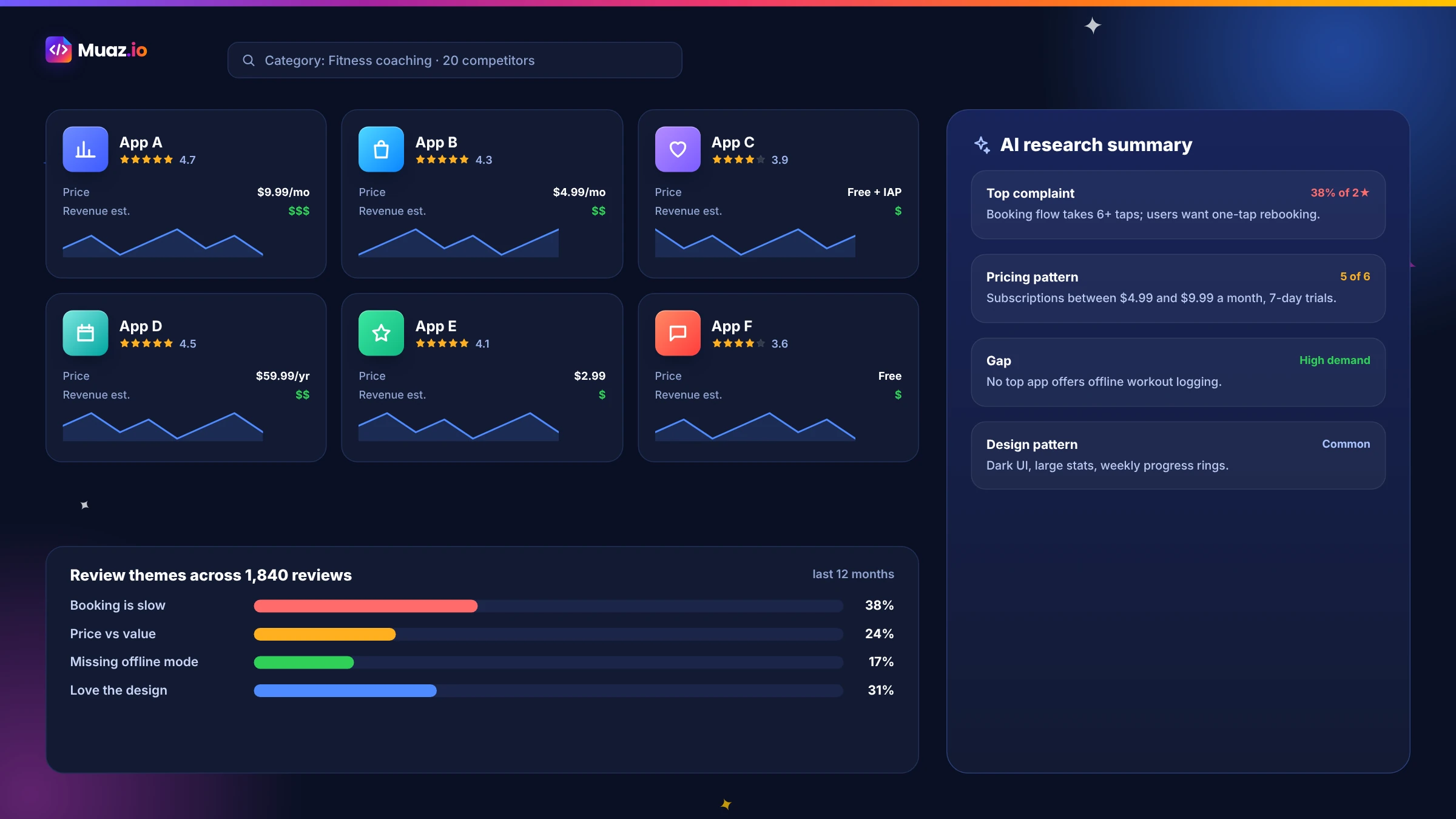
- Group recent reviews into themes such as onboarding, pricing, bugs, missing features and support.
Every app competes with something. Sometimes it is a direct rival with the same features. Sometimes it is a spreadsheet, a notes app or a habit people already have. And in almost every category, it is a handful of apps with thousands of ratings and years of refinement. If your app is not clearly better for someone, the App Store will not save it.
That is why competitor analysis is the most valuable research you can do before building, and one of the most useful habits after launch. This guide shares a practical, repeatable method: how to find the right competitors, what to look for in their screenshots, listings and reviews, how to read revenue estimates without fooling yourself, how to compare features and pricing and how to turn it all into a positioning that guides your app.
It is the same method Muaz.io's research agents use, and you can follow it by hand with free tools or let the agents do it for 5, 10 or 20 apps at once.
Step 1: Define the job, not the category
Start by writing down the job your app does for its user, in their words. "Book a facial without calling the salon." "Track my spending with my partner." "Learn Spanish in ten minutes a day." Then list every way people do that job today, including apps in other categories and non-app alternatives.
This matters because App Store categories are broad. A budgeting app for couples competes with general budgeting apps, banking apps with budgeting features, shared spreadsheets and even group chats. Defining the job reveals your real competition.
Step 2: Find the right competitors
Build a list of 5, 10 or 20 apps, depending on how crowded the space is. Mix three types:
- Direct competitors doing the same job for the same audience.
- Adjacent apps that people use for the job even though it is not their main purpose.
- Category leaders whose patterns set user expectations.
You can find them by searching the App Store for your main keywords, browsing your category's top charts, checking the "You might also like" section on competitors' pages and reading reviews where users mention alternatives. Apple's public Search API returns listing details for apps programmatically, which is what Muaz.io's research engine uses as its base layer.
See your app before you pay for anything
Paste your website or describe your idea. Muaz.io researches your competitors and designs an original app you can try on your iPhone.
Step 3: Read the listing like a strategist
An App Store listing is a compressed strategy document. For each competitor, record:
| Element | What it tells you |
|---|---|
| Name and subtitle | Their main keyword and core promise |
| First three screenshots | Positioning: promise, proof, differentiator |
| Rating and number of ratings | Market traction and satisfaction |
| Price and in-app purchases | Business model and price points |
| Update history | How actively it is developed |
| Description opening | Who it is for and why |
| Developer | Whether it is a big company or a small team |
| In-app events | How they drive re-engagement |
Pay special attention to the first three screenshots. Many people decide whether to install from those alone, so competitors put their strongest message there. When five competitors all lead with the same benefit, that benefit is table stakes in your category. When nobody leads with something users clearly care about, you have found an angle.
Step 4: Analyse screenshots for patterns, not pixels
Screenshot analysis is about understanding choices, not copying designs. For each competitor, note:
- The promise. What outcome does the first caption claim?
- The proof. Which feature do they show as evidence?
- The style. Light or dark, photographic or illustrated, device frames or full bleed?
- The order. Which benefits come first, and which are buried?
- What is missing. Benefits that matter to users but appear nowhere.
Then look across all competitors for patterns: the common promise, the common visual style, the benefits everyone ignores. Your own screenshots should feel familiar enough to signal you belong in the category and different enough to stand out in search results. Our free screenshot generator helps you create your own once you know your message.
A word of caution: do not reproduce competitors' screenshots, icons or distinctive interfaces. Apple's guidelines on intellectual property apply, and copying invites rejection and legal trouble. Muaz.io's research saves patterns as inspiration, never pixels, and the design engine creates original work.
Step 5: Mine reviews for opportunities
Reviews are the most honest research you can get, because people write them unprompted. Read the most recent 50 to 100 reviews for each competitor, focusing on three- and four-star reviews, which often contain the most balanced, specific feedback. Group comments into themes:
- Onboarding: confusing, too long, forced sign-up.
- Pricing: too expensive, unclear trial, unexpected charges.
- Reliability: crashes, sync problems, slow loading.
- Missing features: what people keep asking for.
- Support: slow or helpful responses.
- Delight: what people love and mention by name.
Look for three signals. A complaint that appears for every competitor is an industry-wide gap you can own. A feature praised for one app but missing from others shows what good looks like. And a request repeated across apps but built by none is often your best launch differentiator. Tools such as AppFollow publish comparisons of review and competitor analysis tools if you want automation; Muaz.io groups review themes for every competitor in its research run.
Step 6: Compare features and the core journey
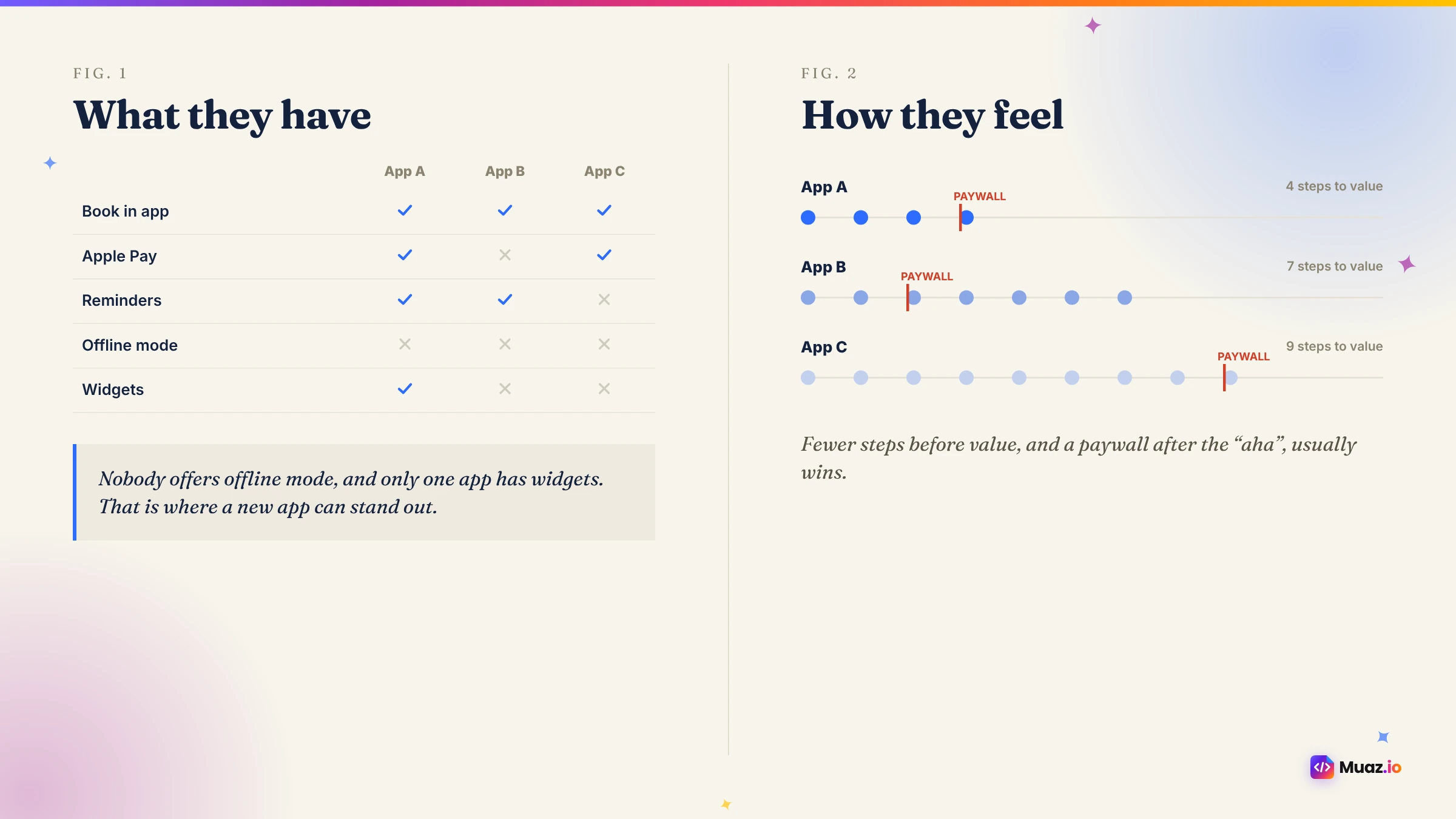
Build a feature matrix, but do not stop at ticks and crosses. For each competitor, walk through the core journey yourself: install, onboarding, the main task and the moment they ask for money. Time it and count the taps.
| Competitor | Steps to first value | Sign-up required before value? | Paywall timing | Standout feature | Biggest complaint |
|---|---|---|---|---|---|
| App A | 4 | Yes | After onboarding | Widgets | Pricing |
| App B | 2 | No | At premium feature | Offline mode | Bugs |
| App C | 6 | Yes | On launch | Integrations | Slow |
Rows like these reveal what matters more than any list of features. If the best-rated competitor gets people to value in two steps without sign-up, your app should too.
Step 7: Research pricing and the business model
Record each competitor's model: free, paid, freemium, hard paywall, subscriptions, one-time purchases or ads. Note plan prices, trial lengths, the default plan on the paywall and any discounts. Patterns tell you what the category will bear.
Benchmarks help you interpret what you see. RevenueCat's 2026 State of Subscription Apps found that hard paywalls converted trials to paid at roughly five times the rate of freemium models by day 35, and that trials of 17 to 32 days converted about 70% better than trials of four days or less. If every competitor uses a three-day trial, a longer trial might be a real advantage. Check your own paywall against these patterns with the free paywall teardown.
Step 8: Read revenue and download estimates responsibly
Revenue intelligence is the most tempting part of competitor research and the easiest to misuse. Apple does not publish per-app revenue, so every figure you see comes from a model. Providers such as Appfigures, Sensor Tower and AppTweak combine public signals, such as chart positions, ratings and known data points, into estimates. Guides like GoPractice's overview of estimating competitor revenue explain the methods and their limits.
Use estimates well:
- Use them for scale and trends, not precise numbers.
- Always note the provider, period and country.
- Prefer category-level patterns over single-app figures.
- Never present estimates as reported financials in investor material.
- Remember revenue is not profit; acquisition costs and salaries are invisible.
For context at the top of the market, Appfigures estimated that TikTok earned about $300 million and ChatGPT about $201 million in net revenue worldwide in May 2026. Your competitors will be far smaller, and estimates for smaller apps in individual countries tend to be less reliable. Muaz.io shows estimates only when a licensed provider supplies them, labels each with its source and says "Unavailable" rather than guessing. Our top charts page explains more.
Start free. Approve every step.
- Research 5, 10 or 20 competitors
- Original design, never copied
- Test on your iPhone today
- You own the code
Step 9: Map keywords and the search landscape
Competitors' names and subtitles reveal which keywords they prioritise. List every word in the names and subtitles of your top ten competitors. Words that appear everywhere are table stakes; words users search for that nobody uses are opportunities. Apple Search Ads provides keyword recommendations and popularity signals, and ASO tools estimate volumes. Our free ASO keyword tool helps you build a metadata plan once you know your target terms.
Step 10: Turn findings into a positioning statement
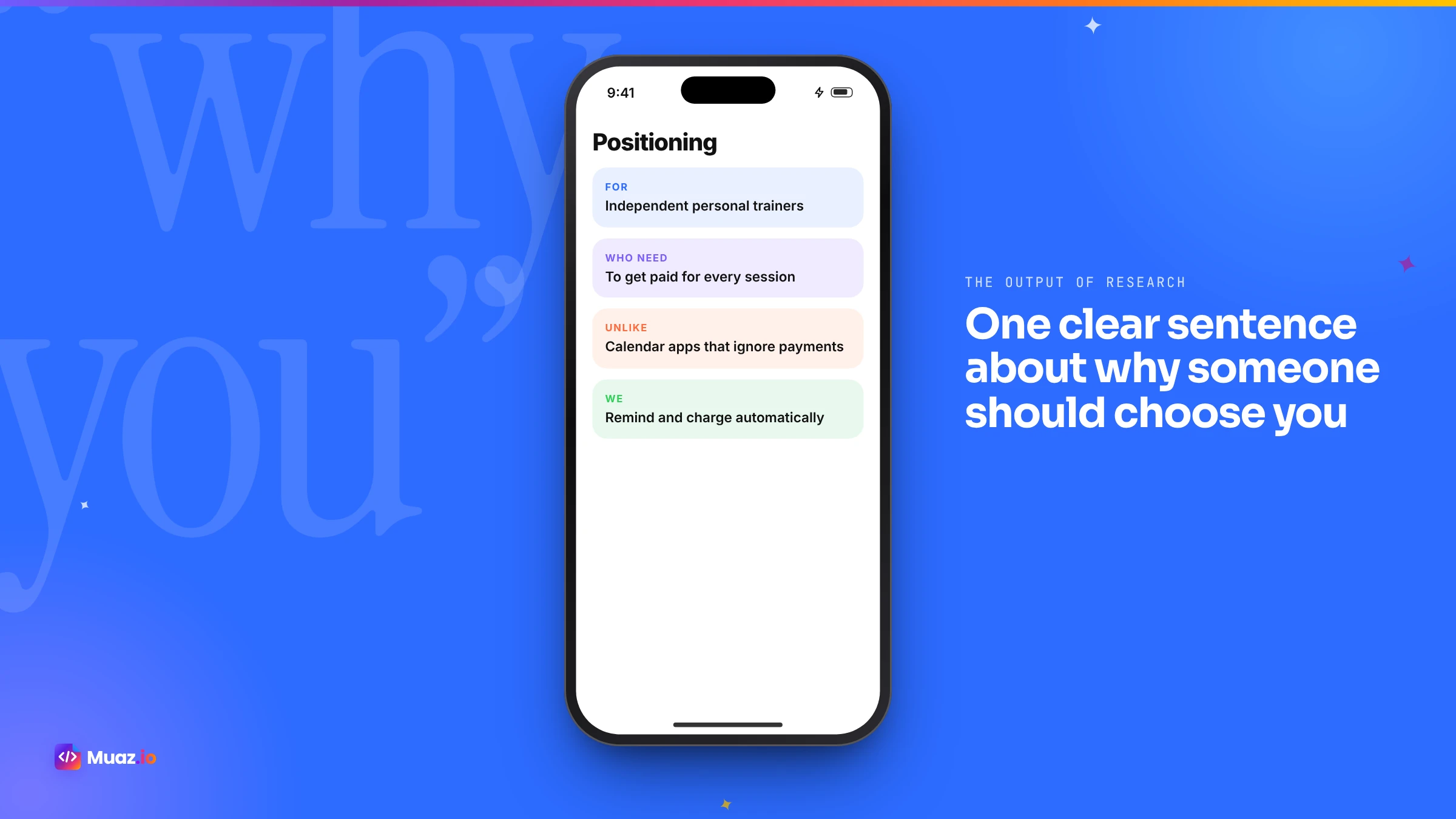
All this research should produce one sentence: for whom your app is the best choice, and why, compared with the alternatives. For example: "For couples who share expenses, BudgeNest is the budgeting app that splits bills automatically, unlike general budgeting apps that track only one person."
That sentence guides your design, your screenshots, your subtitle and your launch plan. If you cannot write it after the research, you are not ready to build. Muaz.io's Product Architect drafts it from the evidence and includes it in the brief you approve.
Doing it by hand versus with AI
| By hand | With Muaz.io | |
|---|---|---|
| Finding competitors | Search, charts and reviews | Automatic, 5, 10 or 20 apps |
| Listings and screenshots | Manual notes | Collected and summarised |
| Review themes | Read and tag reviews | Grouped automatically |
| Revenue estimates | Paid provider subscription | Shown when a provider is connected, with source |
| Feature and journey comparison | Manual walkthroughs | Pattern summary, plus your own walkthrough |
| Positioning and brief | You write it | Drafted for your approval |
| Time | Days | Minutes |
Doing it by hand is valuable and teaches you a lot about your market. Doing it with AI lets you repeat it often and act on it immediately. Many founders do both: let the agents run the analysis, then personally walk through the top three competitors' apps.
Common mistakes in competitor analysis
Only studying direct rivals. Adjacent apps and non-app alternatives often matter more.
Copying the leader. Being a smaller version of the market leader is rarely a winning strategy.
Trusting single revenue figures. Estimates are directional; treat them that way.
Ignoring reviews. Reviews are free, honest and full of opportunities.
Doing it once. Markets move. Repeat research before redesigns, price changes and new markets.
Turning research into action after launch
Competitor analysis does not end at launch. Each quarter, check whether competitors changed their screenshots, subtitles, pricing or paywalls, and whether new apps entered the top results for your keywords. Read their latest reviews for new complaints. Use what you learn to plan your own updates and tests. The Growth Studio in Muaz.io re-runs research on demand and compares it with your previous run, so you can see what moved.
Free: Competitor Teardown Template
The framework our research agents use to compare onboarding, paywalls, ASO and reviews, as an editable worksheet.
We’ll email the resource and a few practical tips. Unsubscribe in one click. We never sell your data.
Your next step
Pick three competitors and spend an hour walking through their apps and reading their reviews; you will learn more than you expect. Then, to see the full picture, run a 10-app research set in Muaz.io for free and review the patterns, review themes and positioning draft. For the bigger strategic picture, our guide to validating an app idea with competitor research and revenue forecasting shows how to decide whether to build at all, and the competitor research page explains the engine in depth.
A worked example: a salon booking app
To show the method in action, imagine researching salon booking apps in the UK. The job is "book a beauty treatment quickly and get reminded". Direct competitors are salon booking marketplaces and individual salon apps; adjacent alternatives include messaging the salon on social media or calling.
The listings show that most competitors lead with "book in seconds" and use photographic screenshots of treatments. Ratings are generally high for the marketplace apps but lower for individual salon apps built with templates. Reviews reveal three recurring complaints: forced account creation before seeing availability, confusing cancellation policies and no reminders. Pricing is free for customers in every case, with salons paying for software.
The journey walkthrough shows the best-rated app gets to available times in two taps; others need five or more. Nobody sends a reminder the morning of the appointment. The positioning writes itself: "For busy clients of independent salons, Glow is the booking app that shows real availability without sign-up and reminds you the morning of your appointment, unlike generic marketplaces that bury your salon among hundreds."
That single sentence shaped the design, the first screenshot caption and the subtitle, and it took an afternoon of research to find.
Analysing onboarding in detail
Onboarding is where competitors win or lose most new users, and it is easy to study. Install each app fresh and record every screen from launch to the first moment of value. Note how many screens there are, which questions they ask, when they request an account, when they ask for notification permission and when the paywall appears. Note the tone of the copy and whether it feels personal. Then compare: the best-rated apps in most categories get people to value quickly, ask for permissions in context and personalise the experience with one or two questions. If competitors make people create an account before showing anything, letting people try first is a strong differentiator.
Analysing retention mechanics
Downloads matter less than whether people come back. Look for the features competitors use to bring users back: streaks, reminders, widgets, new content schedules, social features, progress tracking and in-app events. Use each competitor for a few days and note which notifications you receive, how often and whether they are useful or annoying. Reviews often mention notifications, positively or negatively. A competitor with great acquisition but complaints about spammy notifications is leaving room for a calmer, more respectful app.
Analysing update velocity and momentum
An app's update history tells you how much effort is behind it. A competitor that ships every two weeks with meaningful release notes is investing heavily; one that has not updated in a year may be losing ground. Rising competitors, apps climbing the charts or gaining ratings quickly, deserve special attention, because they often reveal a new approach that users like. Note what changed in their recent updates and how their screenshots evolved. Momentum is often a better signal than size.
Analysing a competitor's audience
Reviews, screenshots and descriptions reveal who an app is really for. Look at the language: professional or casual, technical or simple. Look at the people and scenarios shown in screenshots. Look at which countries the app ranks in and which languages it supports. Sometimes a big competitor serves a broad audience poorly, leaving a specific segment, such as a profession, an age group or a country, underserved. That segment can be your entry point. Our guide to validating an app idea explains how to test whether a segment is large enough.
Presenting your research to investors or clients
Research is most valuable when it changes decisions, so present it clearly. Lead with the positioning statement, then show the evidence: the competitor set, the review themes, the journey comparison and the pricing landscape. Cite every estimate with its provider and period. Show what you will do differently and why users will care. Muaz.io can export research as a report with every figure labelled by source, and agencies can white-label it for clients, as described on the agency page.
Free versus paid research tools
You can do excellent competitor research for free. The App Store itself gives you listings, screenshots, ratings, reviews, pricing and update history. Apple's Search API lets you pull listing data programmatically. Top charts by category and country show who is winning. Reading reviews costs nothing but time. Paid market intelligence tools add revenue and download estimates, keyword rankings, historical charts and alerts when competitors change their listings. They are worth it once you are making decisions that depend on market size or when you need to track many competitors over time. Muaz.io combines the free layers by default and adds licensed estimates when a provider is connected, always labelled with the source.
Building a competitor tracking routine
After launch, a light monthly routine keeps you informed without consuming your week. Check the top results for your three main keywords and note any new entrants. Read the latest reviews of your top three competitors. Look at their screenshots and subtitles for changes. Note any pricing or paywall updates. Write three bullet points on what changed and what it means for you. Over a year, these notes become one of your most valuable strategy documents, showing how your market evolves and which moves worked for others.
How competitor research feeds design
Good research does not end in a spreadsheet; it shapes the product. In Muaz.io, the patterns you save become inputs to the design engine: if you save a competitor's two-tap booking flow and another's calm notification style, the concepts you see will reflect those principles in an original design on your brand. The review themes inform the onboarding, the empty states and the copy. The pricing landscape informs the paywall. That is how research turns into an app people choose.
Questions your research should answer
Before moving on, check that your research answers these questions clearly. Who are the three apps your users will compare you with? What do they charge, and how? What do their users love, and what do they complain about most? How many steps does each take to deliver value? Which keywords do they target, and which do they ignore? What will your app do better, for whom, and how will you show that in your first screenshot? If any answer is fuzzy, run a larger research set or narrow your audience until it is sharp.
Ethical research
Competitor research should be honest and respectful. Use public information: listings, screenshots, reviews and published estimates. Do not create fake accounts to access private areas, scrape in ways that break terms of service or copy proprietary content. Credit sources when you share findings. And remember that behind every competitor is a team working hard; the goal is to serve users better, not to tear anyone down.
Glossary
Direct competitor. An app doing the same job for the same audience.
Adjacent app. An app people use for the job even though it is not its main purpose.
Positioning statement. A sentence describing who your app is best for and why.
Revenue estimate. A modelled figure from a market intelligence provider, not reported data.
Review theme. A recurring topic in user reviews, such as pricing or onboarding.
Table stakes. Features or messages so common in a category that users expect them.
Research will not build your app for you, but it will make sure you build the right one.
Finally, save your research somewhere your whole team can see it. A shared competitor file, updated every quarter, becomes one of the most valuable documents your company owns, because it keeps every design and pricing decision grounded in what the market actually shows.

Monjur builds Muaz.io and incorporated MotionTrust Digital in September 2022, where he leads Amazon strategy across the client base. Eight years in e-commerce and marketplace marketing taught him how much growth a great mobile app unlocks, so every guide here is tested against the real product and current App Store rules before it goes live.
Questions about method guide
Short, direct answers. Still curious? Ask in the builder; the assistant knows your project.
What is the best tool for iOS app competitor analysis?
For revenue and download estimates, market intelligence providers such as Appfigures, Sensor Tower and AppTweak are widely used. For a research-to-design workflow, Muaz.io analyses 5, 10 or 20 competitors and turns the findings into a brief and an original app design. Free sources such as the App Store itself and Apple's Search API cover listings, ratings and screenshots.
How can I see how much a competitor's app earns?
You cannot see exact figures, because Apple does not publish per-app revenue. Third-party providers publish modelled estimates. Treat them as orders of magnitude and trends, always note the provider, period and country, and never present them as reported financials.
How many competitors should I analyze?
Five is enough for a focused niche, ten gives a balanced view and twenty helps in crowded categories. Include direct competitors, adjacent apps people use for the same job and at least one category leader.
What should I look for in competitor screenshots?
The first three screenshots reveal positioning: the promise, the proof and the differentiator. Note the captions, the features they lead with, the visual style and what they leave out. Patterns across competitors show what the category expects.
How do I analyze competitor reviews?
Group recent reviews into themes such as onboarding, pricing, bugs, missing features and support. Compare how often each theme appears in positive and negative reviews. A complaint that appears for every competitor is an opportunity you can own.
Is it legal to copy a competitor's app design?
Copying screenshots, icons, logos or distinctive designs can infringe intellectual property and lead to App Store rejection. Study patterns and principles, then design your own original version.
How often should I repeat competitor research?
Before you build, before major redesigns or price changes, before entering a new country and at least every quarter for keyword and screenshot updates.
Every rival screen, explained.
Muaz breaks down competitors’ onboarding, paywalls and layouts, then designs an original version for your app.
Your second number, in seconds.
Get a US or UK number, receive codes and stay private.
Keep reading
 Research & Growth15 min readHow to Validate an App Idea with Competitor Research Before You Build
A practical, step-by-step method to validate an iPhone app idea using competitor apps, App Store reviews, rankings and pricing, so you build something people already want and will pay for.
Monjur Hossain· SaaS & Web Apps18 min readHow to Convert a SaaS Website into a Native iOS App Using AI (2026 Guide)
A practical, step-by-step guide to turning your SaaS web app into a native iPhone app with AI: what to build, how to connect your API and login, push alerts, App Review and cost.
Monjur Hossain· Tools & Comparisons16 min read10 Best AI iOS App Builders in 2026: Features, Pricing & Native Support
We compared 10 AI app builders specifically for iPhone apps: native output, App Store publishing, code ownership, design quality and 2026 pricing, with honest picks by use case.
Monjur Hossain· Website to App15 min readHow to Turn Any Website into an iPhone App Without Coding (Step-by-Step)
A step-by-step, no-code guide to turning your website into a real iPhone app: checking readiness, choosing native vs WebView, AI conversion, testing on TestFlight and App Store approval.
Monjur Hossain·Tools and products for the next step
- 5, 10 or 20 App Store rivals analysed
- Review themes, pricing and gaps
- Trials, conversion and churn
- No sign-up needed
- Paste a URL, get three original designs
- Free research before you pay
Where our numbers come from
Third-party figures are estimates published by the sources below. Prices and rules change; check the source before you decide.
- Appfigures: most downloaded and highest-earning apps, May 2026appfigures.com/resources/insights/most-downloaded-highest-earning-apps-may-2026
- Appfigures: getting started with the Competitors reportappfigures.com/support/kb/676/getting-started-with-the-competitors-report
- AppFollow: app competitor analysis tools comparedappfollow.io/blog/app-competitor-analysis-tools
- App Radar: top-grossing apps on the US App Storeappradar.com/blog/top-grossing-apps-app-store
- Apple iTunes Search APIperformance-partners.apple.com/search-api
- GoPractice: estimating a competitor app's revenue and audiencegopractice.io/blog/how-to-estimate-the-revenue-downloads-and-audience-of-a-competitors-app
- RevenueCat: State of Subscription Apps 2026www.revenuecat.com/state-of-subscription-apps