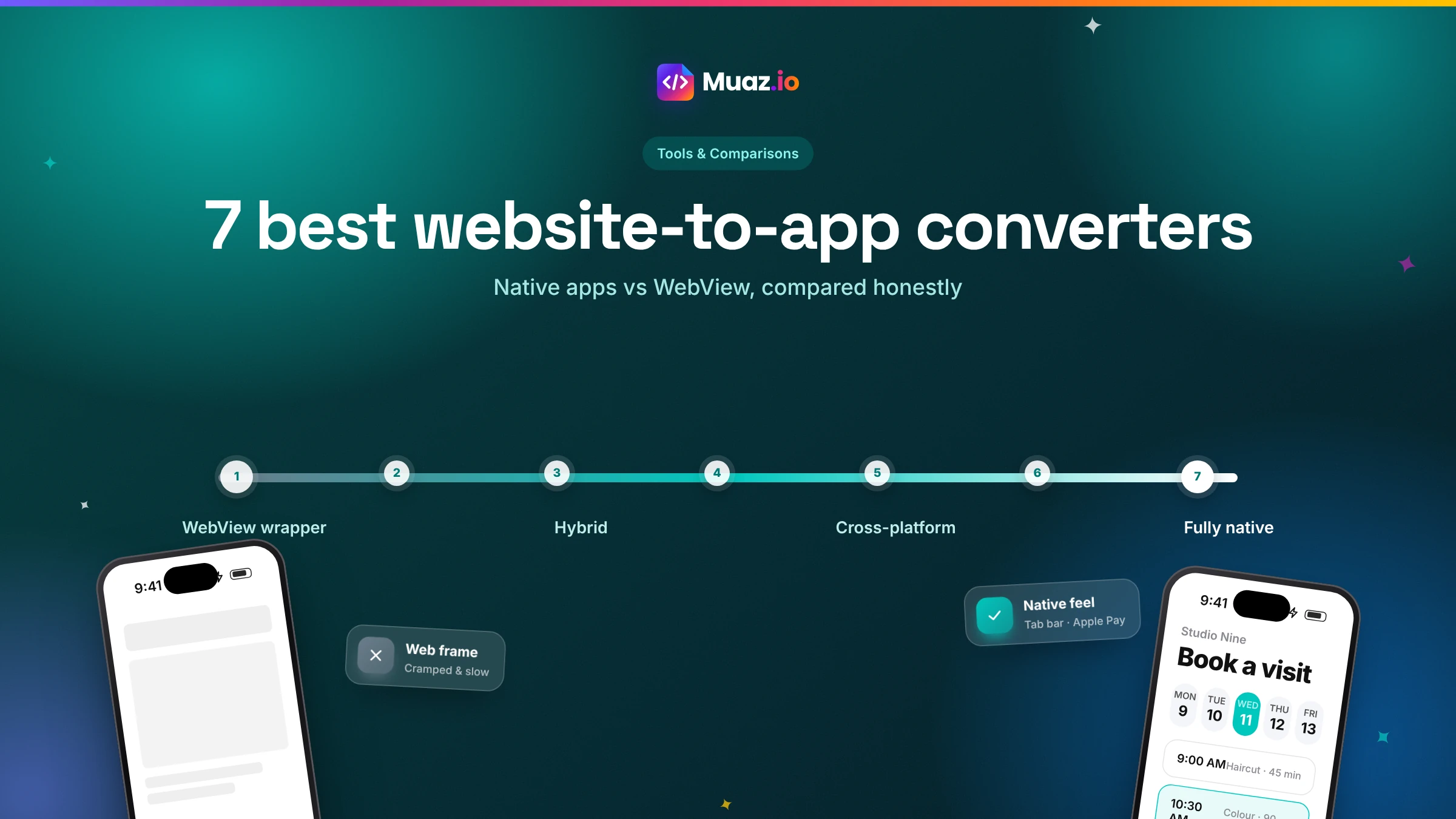
The 7 best website-to-app converters in 2026, and the native vs WebView question nobody explains
Every converter promises your website in the App Store. What they actually deliver ranges from your web pages in a frame to a fully native app. Here is how to tell the difference and choose well.
For a native iPhone app that feels built for the phone, an AI rebuild such as Muaz.io. For packaging an excellent mobile website quickly, Median or MobiLoud. For developers who want full control over a wrapper, Capacitor. The best choice depends on whether you want your website in an app or an app designed from your website.
- Yes, if they provide enough native value. Apple's guideline 4.2 rejects apps that are essentially a repackaged website.
- Ask whether the screens are built with native components or whether the app loads your web pages.
- Wrappers show your live website, so changes appear instantly. Native rebuilds read your content through an API, such as WordPress or Shopify, so new posts, products and prices also appear automatically.
- Some tools offer free tiers with their branding, and Capacitor is open source.
Search for "website to app converter" and you will find dozens of tools, each promising your website in the App Store in days. Some deliver exactly that: your website, in a frame, with an icon. Others rebuild your business as a real iPhone app. Both get described with the same words, which makes choosing surprisingly hard.
This guide cuts through it. We explain the one distinction that matters, native versus WebView, and then compare seven converters across output, App Review risk, features, ownership and published pricing. We have tried to be fair: this guide is published by Muaz.io, one of the tools listed, so we cite sources for every claim about other products and tell you when a competitor is the better fit.
The one distinction that matters: WebView or native
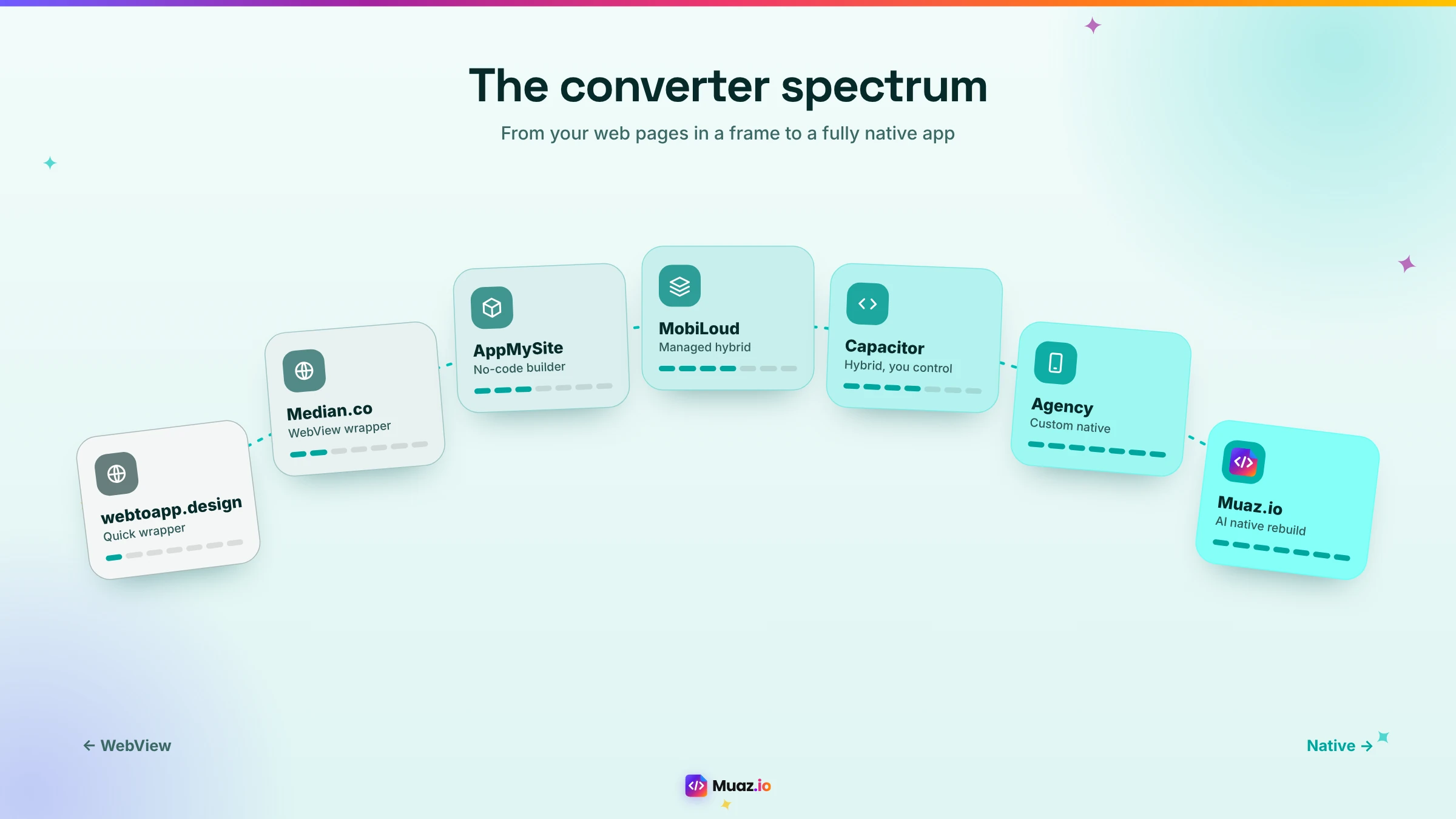
Every website-to-app converter falls somewhere on a spectrum.
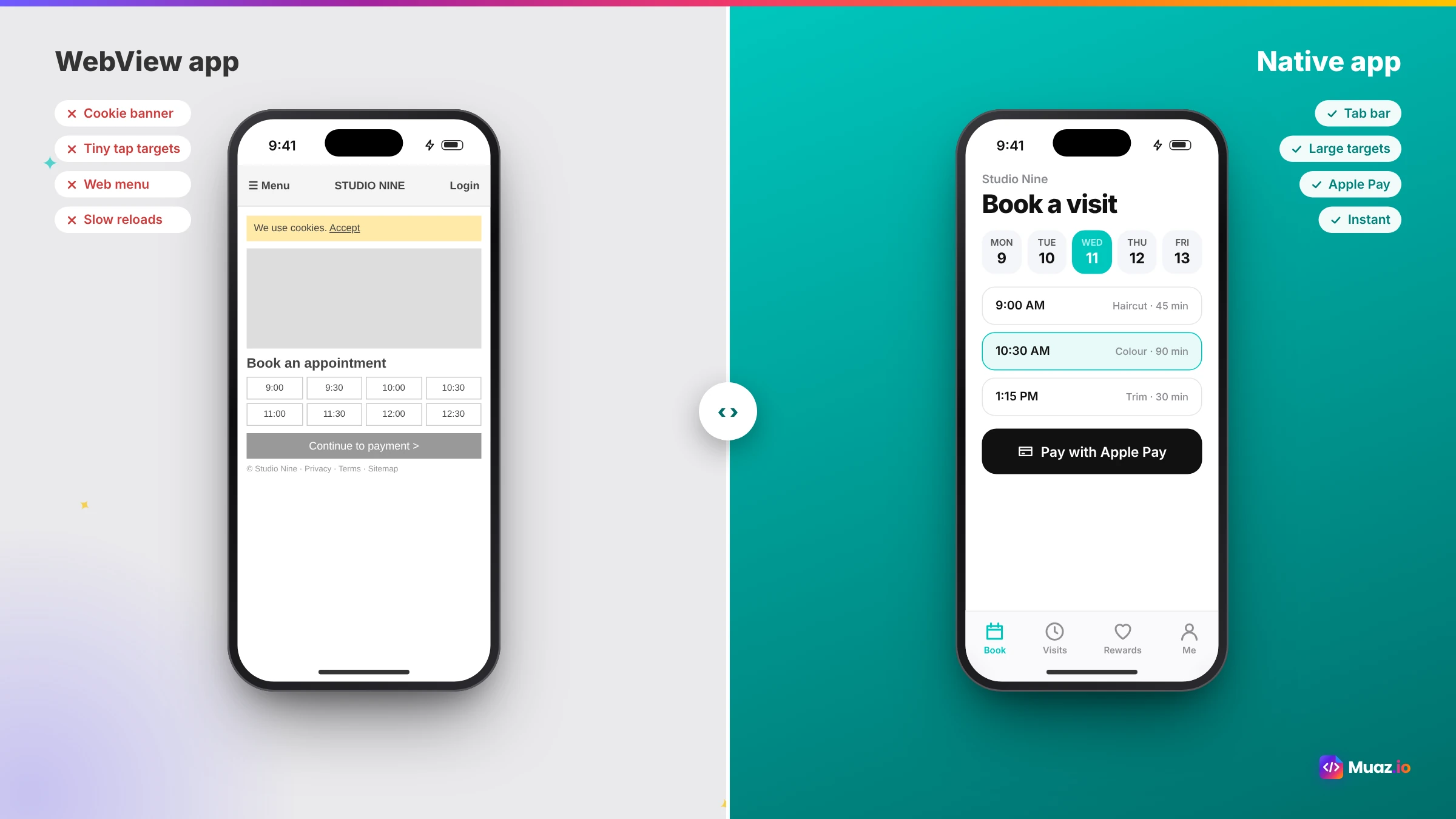
At one end, WebView wrappers. A WebView is a component that displays web pages inside an app. A wrapper app is mostly a WebView pointed at your site, plus a native shell: an icon, a launch screen, maybe a tab bar and push notifications. When you update your website, the app updates instantly. The experience is exactly as good as your mobile website.
In the middle, hybrid apps. Frameworks like Capacitor package your web code inside an app and give it access to native features through plugins. You get more control and more native capability, but the interface is still web-based.
At the other end, native rebuilds. The website becomes a specification, and the app is rebuilt with native components: native tab bars, lists, gestures, transitions, Face ID and Apple Pay. Content comes from your site through an API, so it stays in sync.
Why does it matter? Two reasons. First, users feel the difference within seconds, in scrolling, transitions and responsiveness. Second, Apple's guideline 4.2 says apps should include features, content and UI that elevate them beyond a repackaged website. Wrapper vendors themselves publish guidance on meeting Apple's WebView requirements, and developers regularly discuss rejections on Apple's forums. The closer you are to the wrapper end, the more work you need to do to show native value.
The 7 converters at a glance
| Converter | Approach | Native feel | App Review risk | You own the code | Published price |
|---|---|---|---|---|---|
| Muaz.io | AI native rebuild from your website | High | Low | Yes (React Native) | Free to research and design |
| Median.co | WebView + JavaScript Bridge + plugins | Medium | Medium | No | Free tier; $229 one-time + $179/yr and up |
| MobiLoud | Managed hybrid apps | Medium | Medium (managed review) | No | About $1,000–$2,000 upfront + monthly fee |
| Capacitor | Open-source hybrid framework | Medium | Medium | Yes | Free; cloud builds extra |
| AppMySite | No-code builder for WordPress and WooCommerce | Medium | Medium | No | See vendor |
| webtoapp.design | Wrapper service | Low to medium | Higher | No | See vendor |
| Development agency | Custom native build | High | Low | Yes | Tens of thousands of dollars and up |
Prices: Median from Toolradar (November 2026); MobiLoud from its own cost guide. Where we could not find current published pricing, we say "see vendor".
1. Muaz.io: best for a native app designed from your website
Muaz.io is an AI app builder that reads your website as a specification and rebuilds your business as a native iPhone app. The Website Intelligence Agent maps your pages, flows and brand tokens; the research engine studies 5, 10 or 20 competitor apps in your category; the Product Architect decides what belongs on the phone; the design engine produces three original concepts; and the builders generate React Native and Expo code you own, connected to your content through your platform's API.
- Why choose it: native screens, competitor research, original design from your brand, App Store preparation and a growth plan, with approval at every step.
- Watch out for: if your mobile website is already perfect and you only need store presence fast, a wrapper may be enough.
Read the full process on our website to app page, or follow our step-by-step no-code guide.
2. Median.co: best for packaging a strong mobile website
Median, formerly GoNative, turns your website into iOS and Android apps that display your web content, extended with native capabilities through its JavaScript Bridge and a library of plugins, including push notifications. It is a pragmatic, established choice when your mobile site is already excellent. Toolradar lists a free tier with Median branding, Starter at a one-time $229 plus $179 per year, Essential at $590 plus $399 per year, Plus at $3,290 plus $2,240 per year and a Business plan at $7,200 per year where Median's team builds the apps. For a deeper comparison, see Muaz.io vs Median.
3. MobiLoud: best for a managed, done-for-you hybrid app
MobiLoud positions itself as a done-for-you service that turns websites, especially e-commerce stores, into iOS and Android apps, including handling App Store submission. In its own cost guide, it puts its offering at roughly $1,000 to $2,000 upfront for both platforms plus a few hundred dollars per month, and contrasts that with native development costs of $50,000 or more per platform. It suits brands that want an app without managing the process themselves.
See your app before you pay for anything
Paste your website or describe your idea. Muaz.io researches your competitors and designs an original app you can try on your iPhone.
4. Capacitor: best for developers who want a hybrid app they control
Capacitor is an open-source framework that packages a web app as a native iOS and Android app and exposes native features through plugins. It is popular for apps built with modern web frameworks, including Lovable exports, as Capawesome's Lovable guide shows. Capacitor itself is free; you will need a Mac with Xcode or a cloud build service to produce iOS builds, and someone comfortable with code. The interface remains your web UI, so the same 4.2 considerations apply.
5. AppMySite: best for WordPress and WooCommerce owners who want a no-code builder
AppMySite offers a no-code builder aimed at WordPress and WooCommerce sites, syncing posts and products into app screens. It is approachable for store owners who live in WordPress. Check current pricing and how much of the interface is native on the vendor's site before committing.
6. webtoapp.design: best for the quickest possible wrapper
webtoapp.design is one of several services that wrap a website into an app with minimal setup, and it publishes guides for wrapping sites built with tools like Lovable. It is the fastest route to an app icon on a phone. Expect the experience to match your mobile website, and plan for the App Review considerations above.
7. A development agency: best for complex, custom native apps
Hiring an agency to build a fully custom native app gives you the most control and the best possible quality, at the highest cost and longest timeline. MobiLoud's cost guide cites native development at $50,000 to $500,000 per platform and cross-platform builds at $25,000 to $60,000 for small and mid-sized apps, with maintenance of around 15 to 20% of the build cost per year. For regulated industries or highly custom products, it can be the right call.
How to test any converter in ten minutes
Do not choose from a sales page. Ask for a demo app, install it on your iPhone and run this quick test.
- Scroll a long list. Native lists glide; web lists often stutter or bounce oddly.
- Go back with a swipe. Native apps support the edge swipe everywhere.
- Turn on airplane mode. Does the app show cached content or a blank error page?
- Tap a notification. Does it open the right screen with data loaded, or a web page?
- Check text sizes. Increase the iPhone's text size and see if the app adapts.
- Try checkout or booking. Count the taps and the form fields.
You will know which approach you are looking at within ten minutes.
Features that matter most, by business type
| Business | Most valuable native features | Best fit |
|---|---|---|
| Online store | Apple Pay, saved bag, product browsing, restock alerts | Native rebuild |
| Booking business | Calendar, reminders, Face ID login | Native rebuild |
| SaaS product | Alerts, approvals, widgets, Face ID | Native rebuild |
| Publisher or blog | Offline reading, breaking news alerts | Wrapper or native |
| Community | Notifications, profiles, messaging | Either, depending on mobile site |
| Internal tool already mobile-friendly | Quick distribution | Wrapper |
If your business is in the top three rows, the native features are where the value of the app comes from. Our guides for e-commerce and SaaS go deeper.
What it really costs over a year
Upfront price is only part of the story. Over a year, include the converter's plan, plugin or add-on fees, Apple's $99 annual developer fee, any freelancer help, your time and the cost of updates. Then weigh that against the value of the app: repeat purchases, bookings, retention and customer convenience. A wrapper that saves money upfront but gets rejected twice and delivers a mediocre experience can cost more than a native rebuild that customers love. Our full guide to website-to-iOS app costs puts numbers on each option.
Ownership and lock-in
Ask every vendor who owns the app. With a native rebuild like Muaz.io, you own a standard React Native codebase you can hand to any developer. With Capacitor, you own your project. With hosted wrapper services, the app usually lives on the vendor's platform, and leaving means rebuilding. That can be perfectly fine for a small business that wants a managed service, but it should be a conscious choice, not a surprise.
Our recommendation
If you want an app your customers keep on their home screen, with native speed, Apple Pay, notifications and Face ID, and a low risk of App Review problems, choose a native rebuild. AI has made it nearly as fast as wrapping. If your mobile website is already superb, you need both stores quickly and an app icon is the main goal, a wrapper like Median or a managed service like MobiLoud is a sensible first step. And if you are a developer who wants full control of a hybrid app, Capacitor is excellent.
The best way to decide is to see both. Paste your URL into the Muaz.io builder above to see a native concept of your app in minutes, free, then compare it with your mobile website on your own phone.
Free: Website-to-App Readiness Report
Score your site on 12 factors that decide how well it converts into a native app.
We’ll email the resource and a few practical tips. Unsubscribe in one click. We never sell your data.
Migrating from a wrapper to a native app
Already have a wrapper app in the store? You can move to native without losing your listing. Publish the native version as an update to the same App Store record so you keep your name, ratings and reviews. Explain the improvements in the release notes and refresh your screenshots. Most users simply notice that the app suddenly feels faster and smoother.
The questions to ask before you buy
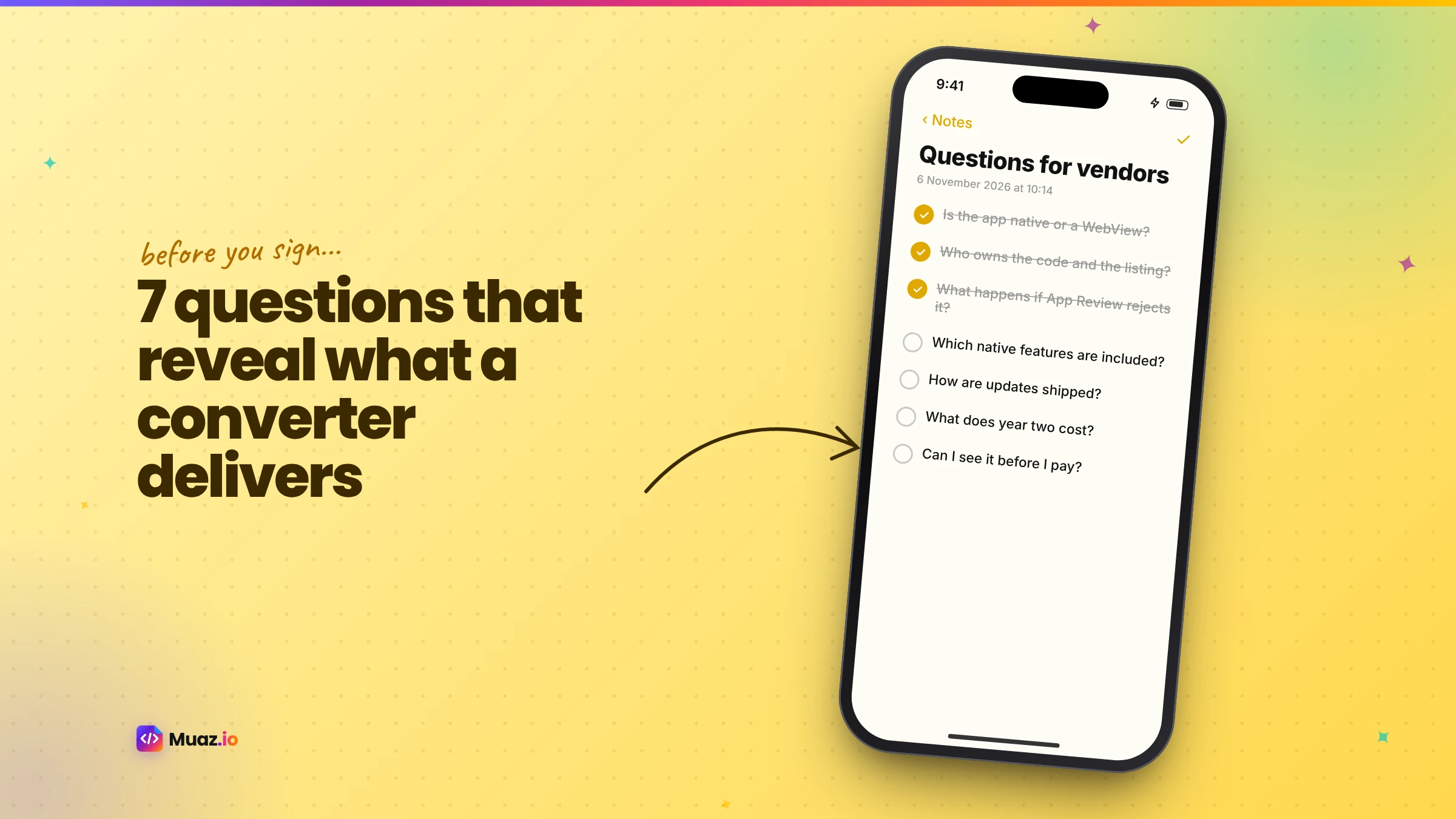
Before you commit to any converter, get clear answers to these questions. Are the screens native components or web pages? Which native features are included, and which cost extra? Who handles App Store submission and rejections? What happens to my app if I stop paying? Can I export the code? How are content updates handled? And can I see three live apps built with the tool, in my category, on the App Store today? A vendor who answers all seven clearly is one you can trust.
A closer look at App Review for converted websites
Apple's review team looks at a converted website the way a new customer would. Does it feel like an app or a website? Can you do something useful without hitting a login wall? Do features like notifications and offline content actually work? Is there anything an app adds that the browser does not? Converters that bake in native navigation, a proper launch experience, push notifications that open specific screens and content that survives without a connection make those questions easy to answer. If your converter relies mainly on displaying your web pages, add at least two clearly native features before you submit, and describe them in your review notes so the reviewer knows where to look.
How converters handle updates
Updates are where the two approaches differ most day to day. With a wrapper, most changes happen on your website and appear in the app immediately, which is convenient but also means any website bug appears in the app instantly too. Changes to the native shell, such as a new plugin, need a new app version. With a native rebuild, content updates flow through your API automatically, while design or feature changes need a new build. AI builders like Muaz.io generate and test those builds for you, so the effort is a sentence rather than a sprint. Either way, plan a regular release rhythm, because apps that update regularly tend to earn better ratings and visibility.
Analytics: measuring what the app adds
Whichever converter you choose, measure what the app adds beyond your website. Compare customers who use the app with those who only use the mobile web: purchase or booking frequency, average order value, retention after 30 and 90 days and support contacts. Track push notification opt-in and the revenue or actions each campaign drives. If the app users are clearly more valuable, the app is working. If not, look at what the app offers that the website does not, and strengthen it. That comparison is also the best way to decide whether to upgrade from a wrapper to a native rebuild later.
Start free. Approve every step.
- Research 5, 10 or 20 competitors
- Original design, never copied
- Test on your iPhone today
- You own the code
Converters for specific platforms
WordPress. Most converters support WordPress, but the quality varies. Wrappers show your theme as it is; WordPress-focused builders map posts and products into app layouts; native rebuilds use the WordPress REST API to create native article lists, search and offline reading. If your theme is heavy or slow on mobile, a native rebuild will feel dramatically faster.
Shopify. Shopping apps live and die by checkout speed. A native rebuild using the Shopify Storefront API gives you native product pages, saved bags and Apple Pay. Wrappers keep your theme's checkout, which can be fine if it is already fast on mobile.
Webflow and other site builders. Webflow sites are often beautiful on desktop but rarely designed for app-like interaction. A native rebuild that reads your CMS collections usually produces a much better app than wrapping the site.
Custom web apps and SaaS. Dashboards and complex interfaces rarely translate well into a WebView. A focused native companion app built on your API is almost always the better choice; our guide to converting a SaaS website into a native iOS app explains how.
Apps built with AI web builders. Tools like Lovable produce web apps. To get them into the App Store, you can wrap them with Capacitor or rebuild them natively. Our guide to converting a Lovable app into a native iOS app compares both routes in detail.
Agencies and white-label converters
If you are an agency converting websites for clients, look for client workspaces, white-label previews, per-client credentials and an approval trail you can share. Wrapper services often offer reseller programmes; native AI builders like Muaz.io offer client workspaces, white-label TestFlight previews and research reports under your brand. The agency page explains how agencies package website-to-app projects and price them profitably.
Red flags when choosing a converter
A few warning signs should make you pause. A vendor that guarantees App Store approval, because nobody can. A demo that only works on desktop. No live apps in your category to try. Vague answers about who owns the app. Pricing that only appears after a sales call for a simple wrapper. And no explanation of how they handle Apple's minimum functionality guideline. None of these are dealbreakers on their own, but together they suggest you will be learning the hard way.
Glossary
WebView. An in-app browser component that displays web pages.
Hybrid app. An app that runs web code inside a native container with access to device features through plugins.
Native rebuild. An app whose screens are built with native components, reading content through APIs.
JavaScript Bridge. A mechanism that lets web code call native features inside a hybrid app.
Guideline 4.2. Apple's minimum functionality rule for App Store apps.
Five scenarios, five recommendations
A local bakery with a simple website and online pre-orders. Customers reorder weekly and love a reminder when fresh bakes are ready. A native rebuild with Apple Pay and pickup notifications is ideal; the app becomes part of the weekly routine.
A news site publishing fifty articles a day. The mobile site is fast and well designed, and the main goal is breaking news alerts and a home screen icon. A wrapper with push notifications and offline reading is a reasonable, quick start.
A fashion brand on Shopify. Repeat customers, drops and restocks. A native rebuild with saved bags, Apple Pay and restock alerts will usually pay for itself in repeat purchases.
A B2B SaaS dashboard. Managers want approvals and alerts on the go, not the full dashboard. A focused native companion app on the existing API is the clear winner.
A membership community already mobile-friendly. Either approach can work; choose native if members want notifications, Face ID and a polished feed, and a wrapper if speed and budget matter most.
A note on Android
Most converters build for both iOS and Android. Wrappers do this almost for free, because the same website appears in both apps. Native rebuilds in React Native or Flutter also share most of their code across platforms. If Android matters to your audience, confirm how each converter handles Google Play, including Google's testing requirements for new personal developer accounts, which Capawesome's guide notes can involve closed testing with a group of testers for a couple of weeks before production access.
The bottom line
A website-to-app converter is a shortcut, but different converters lead to very different places. Wrappers get your website into the store; native rebuilds get your business onto your customers' home screens. Know which one you are buying, test it on your own phone and choose the one your customers will actually keep. If you are unsure, start with the free readiness check and a native concept from Muaz.io, then compare.

Monjur builds Muaz.io and incorporated MotionTrust Digital in September 2022, where he leads Amazon strategy across the client base. Eight years in e-commerce and marketplace marketing taught him how much growth a great mobile app unlocks, so every guide here is tested against the real product and current App Store rules before it goes live.
Questions about website to app
Short, direct answers. Still curious? Ask in the builder; the assistant knows your project.
What is the best website-to-app converter?
For a native iPhone app that feels built for the phone, an AI rebuild such as Muaz.io. For packaging an excellent mobile website quickly, Median or MobiLoud. For developers who want full control over a wrapper, Capacitor. The best choice depends on whether you want your website in an app or an app designed from your website.
Are WebView apps allowed on the App Store?
Yes, if they provide enough native value. Apple's guideline 4.2 rejects apps that are essentially a repackaged website. WebView apps that add native navigation, notifications, offline content and device features are approved; bare wrappers often are not.
How do I know if a converter makes a native app?
Ask whether the screens are built with native components or whether the app loads your web pages. Then install a demo app and try it: native apps scroll, transition and respond like iPhone apps, while web-based apps behave like a mobile website.
Do website-to-app converters keep my content in sync?
Wrappers show your live website, so changes appear instantly. Native rebuilds read your content through an API, such as WordPress or Shopify, so new posts, products and prices also appear automatically. Only layout changes need a new build.
Can I convert my website to an app for free?
Some tools offer free tiers with their branding, and Capacitor is open source. You still need Apple's Developer Program at $99 per year to publish. With Muaz.io, research and design concepts are free so you can see the native app before paying.
Which converter is best for e-commerce?
Stores benefit most from native features such as Apple Pay, saved bags, fast product browsing and push notifications for drops and restocks, so a native rebuild usually wins. If your mobile store is already excellent and speed to market matters most, a wrapper can work as a first step.
Do I own the app if I use a converter?
It varies. With a native rebuild like Muaz.io you own standard React Native code. With Capacitor you own your project. Hosted wrapper services typically build and maintain the app on their platform, so check the terms before you commit.
Skip the wrapper. Deploy a real app.
Native screens, signing, screenshots and TestFlight, handled, so App Review sees an app and not a website in a frame.
Keep reading
 Website to App15 min readHow to Turn Any Website into an iPhone App Without Coding (Step-by-Step)
A step-by-step, no-code guide to turning your website into a real iPhone app: checking readiness, choosing native vs WebView, AI conversion, testing on TestFlight and App Store approval.
Monjur Hossain· Website to App15 min readHow Much Does It Cost to Convert a Website into a Native iOS App in 2026?
Real 2026 costs for turning a website into an iPhone app: agencies, freelancers, wrappers, no-code and AI builders, plus Apple fees, maintenance and the hidden costs most guides skip.
Monjur Hossain· Website to App15 min readHow to Convert a Lovable App into a Native iOS App: Complete Guide
Lovable builds web apps, not native apps. Here are the two real ways to get a Lovable project onto the App Store, wrapping it with Capacitor or rebuilding it natively, with steps, pitfalls and costs.
Monjur Hossain· Tools & Comparisons16 min read10 Best AI iOS App Builders in 2026: Features, Pricing & Native Support
We compared 10 AI app builders specifically for iPhone apps: native output, App Store publishing, code ownership, design quality and 2026 pricing, with honest picks by use case.
Monjur Hossain·Tools and products for the next step
- Paste a URL, get three original designs
- Free research before you pay
- 5, 10 or 20 App Store rivals analysed
- Review themes, pricing and gaps
- Screenshots, metadata and privacy labels
- TestFlight and submission checklist
Where our numbers come from
Third-party figures are estimates published by the sources below. Prices and rules change; check the source before you decide.
- Apple App Store Review Guidelines 4.2: Minimum functionalitydeveloper.apple.com/app-store/review/guidelines/#minimum-functionality
- Toolradar: Median.co pricing (Nov 2026)toolradar.com/tools/median-co/pricing
- MobiLoud: cost of converting a website into an appmobiloud.com/blog/how-much-does-it-cost-to-convert-a-website-into-an-app
- Capacitor documentationcapacitorjs.com/docs
- Capawesome: converting a Lovable app with Capacitorcapawesome.io/blog/convert-lovable-app-to-mobile-app
- MobiLoud: App Store guidelines for WebView wrapperswww.mobiloud.com/blog/app-store-review-guidelines-webview-wrapper
- Apple Developer Forums: WebView rejection threaddeveloper.apple.com/forums/thread/101396