How much does it cost to convert a website into a native iOS app in 2026?
Quotes range from a few hundred dollars to six figures, and both can be honest. Here is what each option really costs, what drives the price and how to estimate your own budget before you talk to anyone.
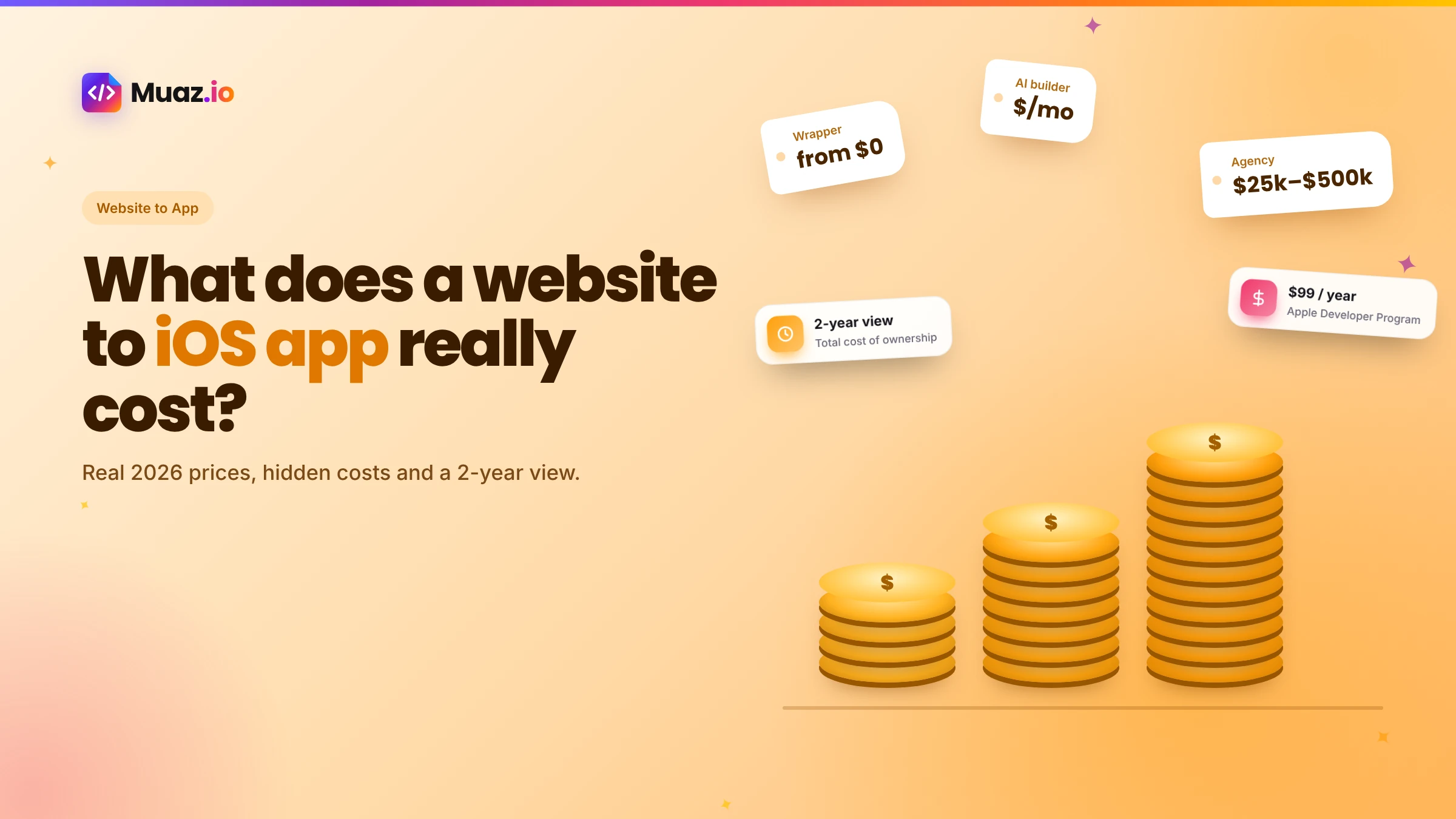
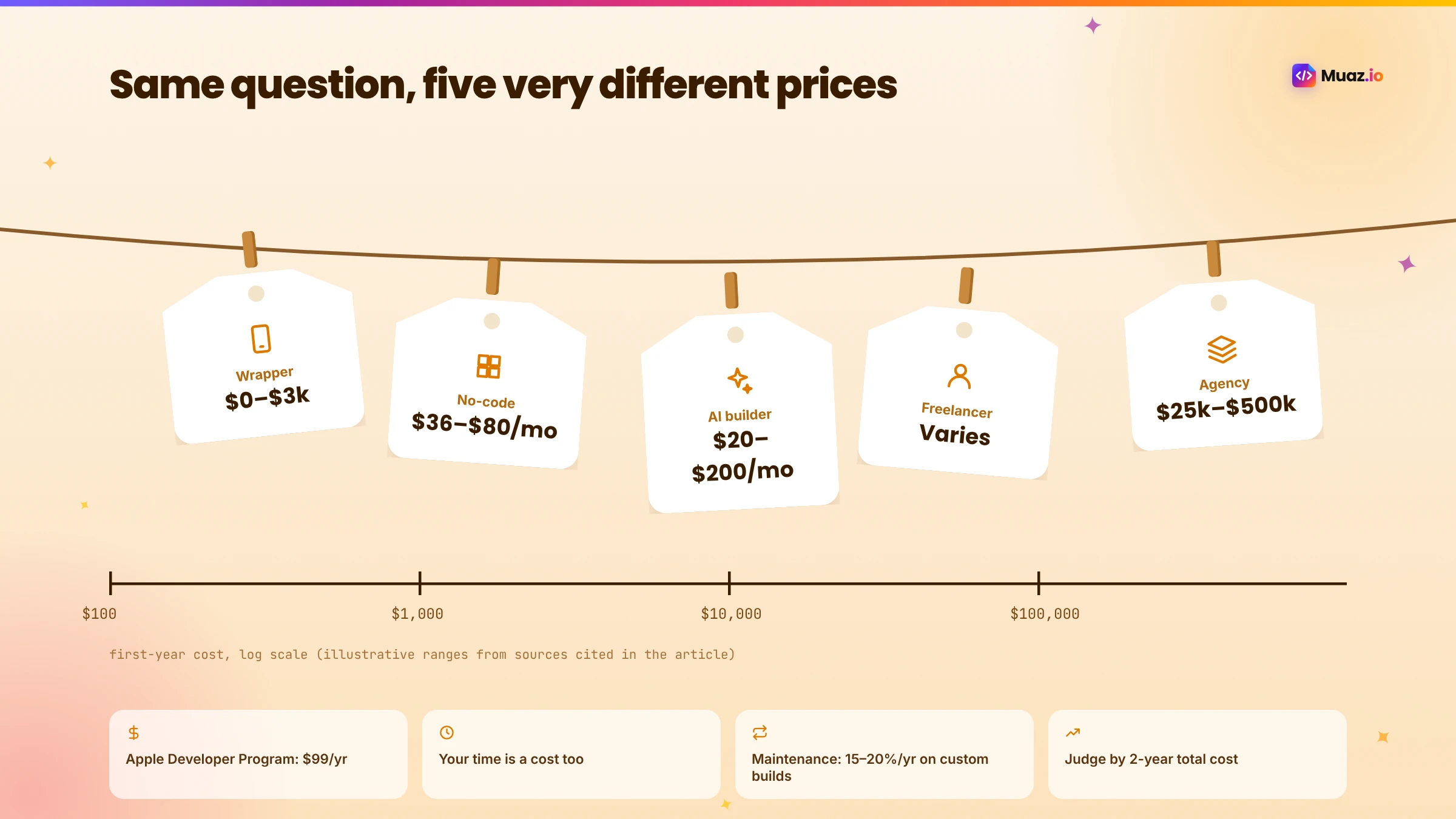
It ranges widely by approach. Wrapper services can cost from a few hundred to a few thousand dollars upfront plus monthly fees. Agency-built native apps commonly cost tens of thousands of dollars or more per platform. AI builders sit much closer to wrapper prices while producing native apps. Apple's Developer Program adds $99 per year in every case.
- A basic wrapper on a free or low-cost plan is the cheapest way to get an app icon in the store, but it carries more App Review risk and delivers a web-like experience.
- Yes. The Apple Developer Program costs $99 per year. Apple also takes a commission on digital goods and subscriptions sold in the app, typically 15% for developers in the Small Business Program and 30% otherwise.
- For custom-built apps, MobiLoud's guide cites maintenance at around 15 to 20% of the initial build cost per year.
- Quotes depend on the number of screens, integrations, custom design, the team's location and seniority, testing depth, project management and whether maintenance is included.
"How much will it cost?" is usually the first question anyone asks about turning a website into an app, and the hardest to get a straight answer to. Ask three agencies and you might get three quotes that differ by ten times. Search online and you will find tools promising an app for the price of a takeaway, next to articles quoting six figures.
The confusing part is that all of these numbers can be honest. They are prices for very different things: a website wrapped in an app shell, a no-code app assembled from templates, a native app designed and built by a team, or a native app generated by AI. This guide breaks down what each option really costs in 2026, what drives the price, the hidden costs most quotes leave out and how to estimate your own budget before you talk to anyone.
The short answer
Here is the landscape at a glance, using published figures where they exist.
| Approach | Typical upfront cost | Ongoing cost | What you get |
|---|---|---|---|
| WebView wrapper service | Free tiers to a few thousand dollars | Annual or monthly fees | Your website inside an app shell |
| Managed hybrid service | About $1,000–$2,000 (MobiLoud's figure) | A few hundred dollars per month | A managed web-based app |
| No-code builder | Monthly plans, about $36–$80 per month | Ongoing plan | Template-based app on the platform |
| AI app builder | Free to research and design; paid build plans | Ongoing plan | Native app, often with code you own |
| Freelancer | Varies widely by scope and location | Hourly for changes | Depends entirely on the freelancer |
| Cross-platform agency build | About $25,000–$60,000 (MobiLoud's figure) | Five figures per year | Custom native app |
| Fully native agency build | About $50,000–$500,000 per platform (MobiLoud's figure) | 15–20% of build cost per year | Fully custom native app |
Plus, in every case, Apple's Developer Program at $99 per year. The agency and managed figures come from MobiLoud's cost guide; no-code plan prices from native.express (October 2026); wrapper pricing examples from Toolradar's Median listing (November 2026).
Option 1: WebView wrappers
A wrapper puts your existing website inside a native app shell. It is the cheapest way to get an icon on the App Store. Median, for example, lists a free tier with Median branding, Starter at a one-time $229 plus $179 per year, Essential at $590 plus $399 per year, Plus at $3,290 plus $2,240 per year and a Business plan at $7,200 per year where Median's team builds the apps, according to Toolradar. Open-source Capacitor is free to use, though you pay for a developer's time and possibly a cloud build service; Capawesome lists cloud build plans from $19 per month in its guide.
What you get for the money: your website, an icon, push notifications and some native features through plugins.
Hidden costs: App Review risk under guideline 4.2, which can mean rework; the experience depends entirely on your mobile site; and if users expect a real app, a rebuild later.
See your app before you pay for anything
Paste your website or describe your idea. Muaz.io researches your competitors and designs an original app you can try on your iPhone.
Option 2: Managed hybrid services
Managed services build and maintain a hybrid app for you, often specialising in e-commerce. MobiLoud describes its own offering at roughly $1,000 to $2,000 upfront for iOS and Android, ready in under a month, plus a few hundred dollars per month including updates. You pay more than a self-service wrapper but get done-for-you setup and store submission.
What you get: a managed, web-based app with native features and support.
Hidden costs: ongoing monthly fees for as long as you have the app, and the app typically lives on the vendor's platform.
Option 3: No-code builders
No-code builders let you assemble an app from components. According to native.express, Adalo's Starter plan is $36 per month billed annually, Thunkable's Builder plan $37 per month, Bubble's Mobile Starter $42 per month and FlutterFlow's Basic and Growth plans $39 and $80 per month. The plan is cheap; your time is the main cost.
What you get: an app you build yourself, sometimes with code export on higher plans.
Hidden costs: your hours learning and building, design skills you may not have and limits as the app grows. Read our Rork vs FlutterFlow vs Adalo comparison for the trade-offs.
Option 4: AI app builders
AI builders generate the app for you, from a prompt or, in Muaz.io's case, from your website and competitor research. Published plans for AI builders in late 2026 sit in a similar monthly range to no-code tools; native.express lists Rork Pro from $20 per month and Rork Max from $200. With Muaz.io, research and three native design concepts are free, so you see the app before paying, and paid plans cover builds and team features.
What you get: a native app, research, original design, testing and App Store preparation, often with standard code you own.
Hidden costs: usage beyond your plan's limits, and the usual Apple fees. Your time is far lower than with no-code, because you approve decisions rather than building screens.
Option 5: Freelancers
Freelancers range from beginners wrapping websites cheaply to senior mobile engineers charging premium rates. Marketplaces are full of offers to convert websites or AI-built web apps into iOS apps. The cost depends on scope, location and experience, and quality varies enormously.
What you get: whatever the freelancer delivers, which can be excellent.
Hidden costs: management time, unclear ownership if contracts are vague, availability for future updates and the risk of starting over if the relationship ends.
Option 6: Agencies
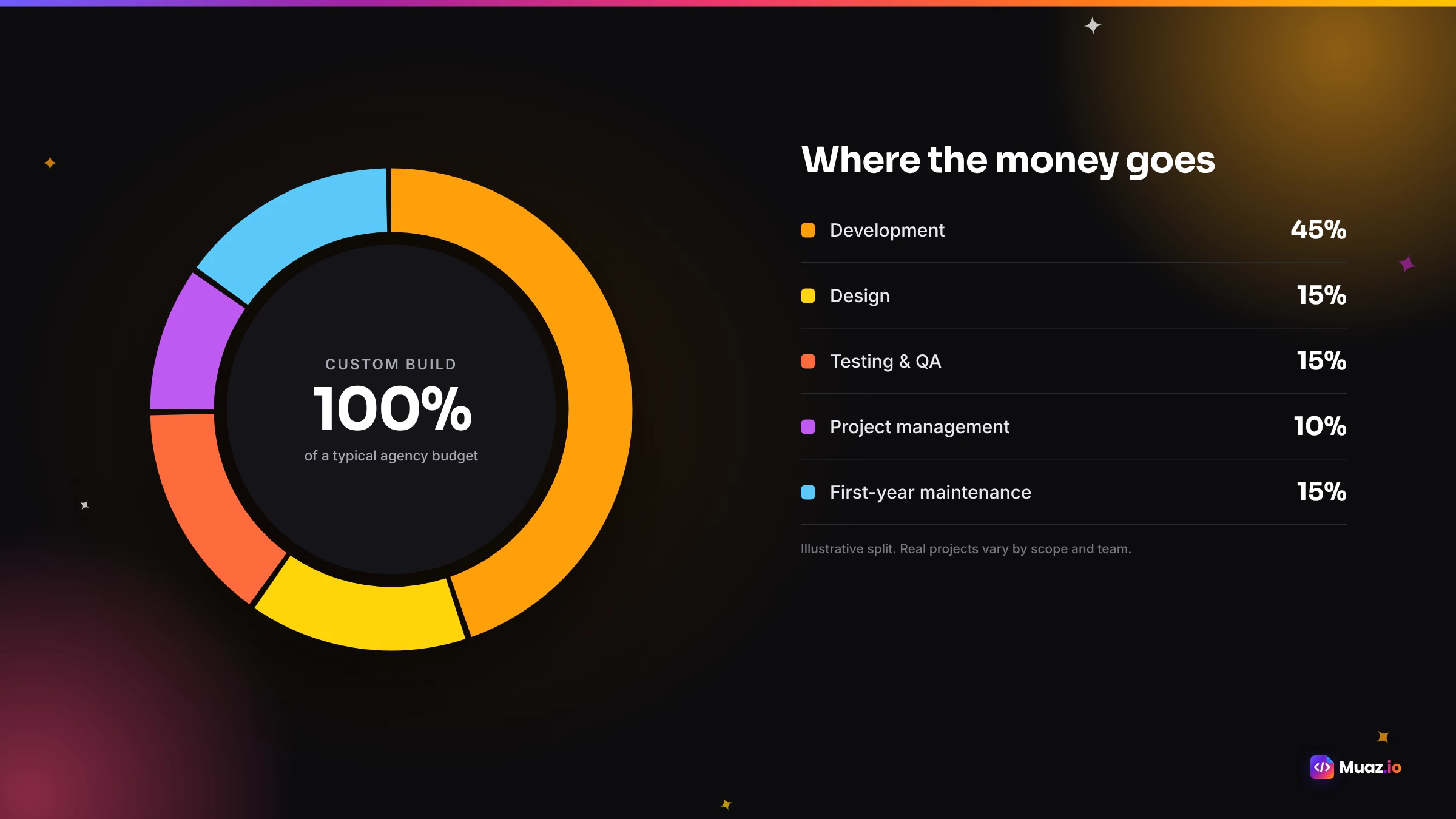
Agencies design and build custom apps with dedicated teams. MobiLoud's guide puts cross-platform builds at $25,000 to $60,000 for small to mid-sized apps and fully native builds at $50,000 to $500,000 per platform, with maintenance around 15 to 20% of the build cost per year. Agencies are the right choice for complex, regulated or highly custom products with the budget to match.
What you get: a custom app, project management, design and testing.
Hidden costs: change requests, long timelines before you can test with users and ongoing maintenance contracts.
What drives the price
Whichever route you choose, a handful of factors move the cost most.
- Number of screens and flows. Each unique screen needs design, build and testing.
- Integrations. Payments, bookings, CRMs, logins and custom APIs add complexity.
- Native features. Push notifications, Face ID, widgets, offline mode and camera features each add work.
- Custom design. Original design costs more than templates, and is usually worth it.
- Platforms. iOS only is cheaper than iOS and Android, unless you use a cross-platform approach.
- Testing depth. More devices, more scenarios and accessibility checks add time.
- Team location and seniority. Rates vary widely around the world.
- Maintenance. iOS updates, bug fixes and new features continue after launch.
The hidden costs most quotes leave out
Even good quotes often skip these line items. Add them to your budget.
| Hidden cost | Typical range or note |
|---|---|
| Apple Developer Program | $99 per year |
| Google Play (if Android) | $25 one-time |
| App Store assets | Icon, screenshots in required sizes, copy |
| Privacy policy and legal review | Varies |
| Backend and API work | Endpoints for push tokens, auth changes |
| Third-party services | Push, analytics, crash reporting, subscriptions |
| App Review rework | Time to fix rejections |
| Marketing at launch | Email, social, in-store signage |
| First-year maintenance | 15–20% of custom build cost per year (MobiLoud) |
| Apple's commission on digital sales | 15% (Small Business Program) or 30% |
Apple's Small Business Program reduces the commission on digital goods and subscriptions for eligible developers. Physical goods and services, such as products from your store or bookings, use your normal payment provider without Apple's commission.
Three sample budgets
To make this concrete, here are three illustrative first-year budgets. They are examples, not quotes.
A local bakery with online pre-orders. Needs native pre-ordering, Apple Pay and pickup notifications. With an AI builder: an AI plan, Apple's $99 fee and a few hours of the owner's time. With an agency: likely a cross-platform build in the tens of thousands of dollars plus maintenance.
A Shopify fashion brand. Needs catalogue sync, saved bags, Apple Pay and drop alerts. With a managed hybrid service: about $1,000 to $2,000 upfront plus a monthly fee, per MobiLoud. With an AI builder: a native app on an AI plan plus Apple's fee. With an agency: tens of thousands or more.
A B2B SaaS company. Needs a companion app on its API with SSO and alerts. With an AI builder: a plan with team features, Apple's fee and a few days of an engineer's time for API access. With an agency: a cross-platform build plus ongoing maintenance.
Start free. Approve every step.
- Research 5, 10 or 20 competitors
- Original design, never copied
- Test on your iPhone today
- You own the code
Total cost of ownership: think in years, not launches
The cheapest launch is not always the cheapest app. Compare options over two years, including your time, rework and the value the app creates. A wrapper that costs little upfront but gets rejected twice, delivers a mediocre experience and is replaced by a native app in year two can cost more in total than a native app built once. A custom agency build may be worth it for a complex product, but its maintenance contract will dwarf the initial build over time.
A simple formula helps: total cost = upfront build + (monthly fees × 24) + Apple fees + your hours × your hourly value + expected rework + maintenance. Run it for two or three options and the right choice usually becomes clear.
How AI changed the economics
The biggest change in 2026 is that the expensive parts of a custom app, research, product definition, design, engineering, testing and App Store preparation, can now be automated. That does not make apps free, but it compresses the cost of a native app towards the cost of a wrapper. With Muaz.io, you see competitor research and three native design concepts before paying anything, and the build, testing and launch preparation happen in days rather than months. That changes the question from "can we afford an app?" to "do we have a reason for customers to come back?"
How to get an accurate quote
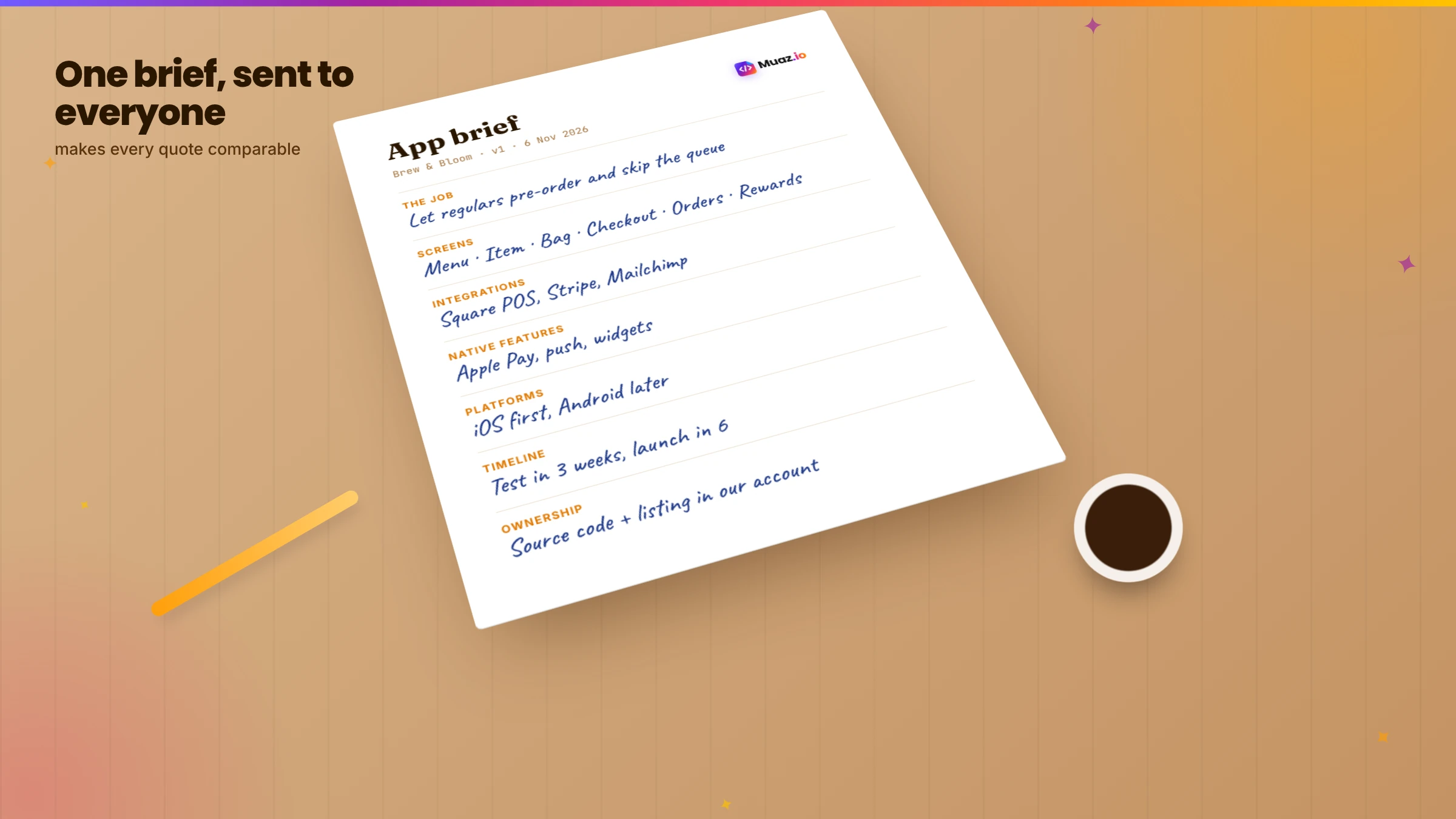
If you do talk to agencies or freelancers, you will get better, more comparable quotes by sending the same brief to each:
- The job. Who the app is for and the main task, in one paragraph.
- The screens. A list of screens, even rough.
- The integrations. Platforms and APIs the app must connect to.
- The native features. Notifications, Face ID, payments, offline.
- The platforms. iOS only or iOS and Android.
- The timeline. When you want to test and when you want to launch.
- Ownership. That you require the source code and the App Store listing in your account.
- Maintenance. Ask for a separate quote for the first year.
Muaz.io's free brief, generated from your website and research, makes an excellent starting document even if you end up working with someone else.
Return on investment: is it worth it?
The cost only makes sense against the value. For shops, the value is repeat purchases and higher order frequency from loyal customers. For booking businesses, fewer no-shows thanks to reminders and easier rebooking. For SaaS companies, better retention and expansion among accounts that use the app. For creators, recurring subscription revenue. Use the free app revenue calculator to model subscription revenue, and compare app users with web users after launch to measure the real return.
Free: App Budget Calculator Sheet
Estimate build, launch and first-year costs for every approach, with the line items most quotes leave out.
We’ll email the resource and a few practical tips. Unsubscribe in one click. We never sell your data.
Our recommendation
If you have a website and customers who come back, start by seeing what a native app would look like before you spend anything: run Muaz.io's free research and design with your URL. If the result fits your needs, an AI builder is likely your best value. If your mobile site is already excellent and you only need store presence fast, a wrapper is a reasonable first step. And if your product is highly complex or regulated, get agency quotes using the brief above, and budget for maintenance from day one.
For a step-by-step look at the process itself, read our guide to turning a website into an iPhone app without coding, and to compare tools, see the best website-to-app converters.
Cost by app type
Different kinds of apps cost differently to build and run, whatever route you take.
Content and information apps are among the cheapest: mostly lists, articles and search, with notifications. A wrapper or an AI builder handles them easily.
Booking and service apps add calendars, availability, reminders and payments. Integration with your booking platform is the main cost driver.
Shopping apps add catalogue sync, product pages, saved bags, checkout with Apple Pay and campaigns. Connecting to platforms like Shopify keeps costs manageable; custom commerce backends cost more.
SaaS companion apps depend on your API. If it is well documented, AI builders connect quickly; if not, expect engineering time to expose the endpoints the app needs.
Community and social apps add profiles, feeds, messaging and moderation, which increase complexity and ongoing operational cost.
Marketplaces are the most complex, with two-sided flows, payments between parties and trust and safety features.
Ongoing costs after launch
Budget for the app's life, not just its birth. Every year brings a new iOS version, which can require updates. Users report bugs and request features. Third-party services change their APIs. Your App Store listing needs fresh screenshots and keywords. And growth activities, such as notifications, experiments and campaigns, take time. With custom builds, these costs appear as maintenance contracts. With AI builders, much of the work is generated and tested for you within your plan, which is one of the biggest long-term savings.
Mistakes that inflate costs
Building everything at once. Every extra feature adds design, build, testing and maintenance. Launch with the core job and add features users ask for.
Changing the brief mid-build. Late changes are expensive with agencies. Decide what version one is before building.
Skipping research. Building an app nobody needs is the most expensive mistake of all.
Ignoring ownership. If you do not own the code, leaving a vendor means paying to rebuild.
Underestimating App Review. Rejections cost time, and time costs money. Prepare properly the first time.
How to cut costs without cutting quality
A smaller budget does not have to mean a worse app. These are the levers that save the most money while keeping the experience native and polished.
Start with iOS only. If most of your customers use iPhones, launch there first, learn what works and add Android later. You halve the testing surface and the design work for version one.
Reuse what you already have. Your website already has content, product data, branding and often an API. An app that reads from the same systems avoids rebuilding a back office. With Muaz.io, your existing site is the starting point for both research and design, so nothing has to be typed in twice.
Use standard native components. Apple's own patterns, tab bars, lists, sheets and system fonts, look premium and cost less to build and test than heavily custom controls. Custom flourishes are worth it on the one or two screens people remember, not everywhere.
Validate before you build. Spending a few hours studying competitor apps and their reviews tells you which features customers actually value. Our guide to validating an app idea with competitor research walks through the process, and the iOS app competitor analysis guide shows how to read the signals.
Own your code. Choosing a route that gives you standard source code, such as an AI iOS app builder with React Native source code, protects you from paying to rebuild if you switch vendors later.
Automate the boring parts. App Store screenshots, metadata, privacy labels and test runs are repetitive. Tools that generate them save days per release, and every release after the first.
Questions to ask before you pay anyone
Whichever option you lean towards, a short list of questions separates good value from expensive surprises.
- Who owns the source code, the App Store listing and the Apple Developer account?
- What exactly is included in the price, and what counts as a change request?
- How are iOS updates and App Review rejections handled, and at whose cost?
- Which native features are included, and which need plugins or extra work?
- Can I see the app, or a design of it, before paying the full amount?
- What happens to the app if I stop paying the monthly fee?
- How long does an update take from request to release?
- What analytics will I get to measure whether the app is working?
If a provider cannot answer these clearly, treat it as a warning sign, whatever the price.
A note on Android
This guide focuses on iOS, but most businesses eventually ask about Android. Google Play charges a one-time $25 registration fee, compared with Apple's annual $99. Cross-platform approaches, such as React Native, let one codebase serve both stores, which is why cross-platform agency builds are usually cheaper than two fully native builds. If you start with an approach that produces React Native code, adding Android later is an extension rather than a second project. For a deeper look at the iOS side, read our guide to converting a SaaS website into a native iOS app.
Glossary
WebView wrapper. An app that displays your website inside a native shell.
Hybrid app. An app that runs web code in a native container with access to device features.
Cross-platform app. A native app built once for iOS and Android, for example with React Native or Flutter.
Total cost of ownership. The full cost of an app over time, including fees, maintenance, rework and your time.
Small Business Program. Apple's programme that reduces its commission for eligible developers.
Final word
The right budget for your app is the one that gets a useful, native experience into your customers' hands without locking you into costs you cannot control. Know what each option really delivers, add the hidden costs, think in years and measure the value after launch. And before you sign anything, see your app for free; it is the easiest way to know what you are paying for.

Monjur builds Muaz.io and incorporated MotionTrust Digital in September 2022, where he leads Amazon strategy across the client base. Eight years in e-commerce and marketplace marketing taught him how much growth a great mobile app unlocks, so every guide here is tested against the real product and current App Store rules before it goes live.
Questions about cost guide
Short, direct answers. Still curious? Ask in the builder; the assistant knows your project.
How much does it cost to turn a website into an app?
It ranges widely by approach. Wrapper services can cost from a few hundred to a few thousand dollars upfront plus monthly fees. Agency-built native apps commonly cost tens of thousands of dollars or more per platform. AI builders sit much closer to wrapper prices while producing native apps. Apple's Developer Program adds $99 per year in every case.
What is the cheapest way to make an iOS app from my website?
A basic wrapper on a free or low-cost plan is the cheapest way to get an app icon in the store, but it carries more App Review risk and delivers a web-like experience. For a native app at low cost, an AI builder is usually the best value.
Do I have to pay Apple to publish an app?
Yes. The Apple Developer Program costs $99 per year. Apple also takes a commission on digital goods and subscriptions sold in the app, typically 15% for developers in the Small Business Program and 30% otherwise. Physical goods and services use your normal payment provider without Apple's commission.
How much does app maintenance cost?
For custom-built apps, MobiLoud's guide cites maintenance at around 15 to 20% of the initial build cost per year. Wrapper services usually include updates in a monthly fee. AI builders generate and test updates as part of their plans, which lowers ongoing cost.
Why do agency quotes vary so much?
Quotes depend on the number of screens, integrations, custom design, the team's location and seniority, testing depth, project management and whether maintenance is included. Two honest quotes can differ by several times for the same brief.
Is a cheaper app a false economy?
It can be. A low-cost app that gets rejected, feels like a website or needs rebuilding after a year can cost more in total than a better app built once. Compare total cost of ownership and the value the app creates, not just the upfront price.
How can I estimate my budget before getting quotes?
List the screens and integrations you need, decide whether you need native features, choose an approach, then add Apple's fee, design, testing, launch and a year of maintenance. The calculator sheet on this page lists every line item.
See your app before you pay for it.
Research and three design concepts are free. A plan starts only when you want the build and the App Store launch.
Keep reading
 Website to App15 min readHow to Turn Any Website into an iPhone App Without Coding (Step-by-Step)
A step-by-step, no-code guide to turning your website into a real iPhone app: checking readiness, choosing native vs WebView, AI conversion, testing on TestFlight and App Store approval.
Monjur Hossain· Tools & Comparisons15 min read7 Best Website-to-App Converters in 2026: Native Apps vs WebView
An honest comparison of 7 website-to-app converters in 2026, from WebView wrappers to native AI rebuilds: how each works, App Review risk, features, ownership and published pricing.
Monjur Hossain· SaaS & Web Apps18 min readHow to Convert a SaaS Website into a Native iOS App Using AI (2026 Guide)
A practical, step-by-step guide to turning your SaaS web app into a native iPhone app with AI: what to build, how to connect your API and login, push alerts, App Review and cost.
Monjur Hossain· Website to App15 min readHow to Convert a Lovable App into a Native iOS App: Complete Guide
Lovable builds web apps, not native apps. Here are the two real ways to get a Lovable project onto the App Store, wrapping it with Capacitor or rebuilding it natively, with steps, pitfalls and costs.
Monjur Hossain·Tools and products for the next step
- Paste a URL, get three original designs
- Free research before you pay
- Trials, conversion and churn
- No sign-up needed
- 5, 10 or 20 App Store rivals analysed
- Review themes, pricing and gaps
Where our numbers come from
Third-party figures are estimates published by the sources below. Prices and rules change; check the source before you decide.
- MobiLoud: how much it costs to convert a website into an appmobiloud.com/blog/how-much-does-it-cost-to-convert-a-website-into-an-app
- Toolradar: Median.co pricing (Nov 2026)toolradar.com/tools/median-co/pricing
- Apple Developer Programdeveloper.apple.com/programs
- Apple App Store Small Business Programdeveloper.apple.com/app-store/small-business-program
- Capawesome: Capacitor cloud builds and requirementscapawesome.io/blog/convert-lovable-app-to-mobile-app
- Expo pricingexpo.dev/pricing