The 90-Day App Launch Marketing Plan: From Pre-Launch Waitlist to Scalable Revenue
A dated, day-by-day plan for the 90 days around your app's release. Get the waitlist playbook, TestFlight beta steps, launch countdown, eight-email sequence, KPI dashboard and a checklist you can copy today.
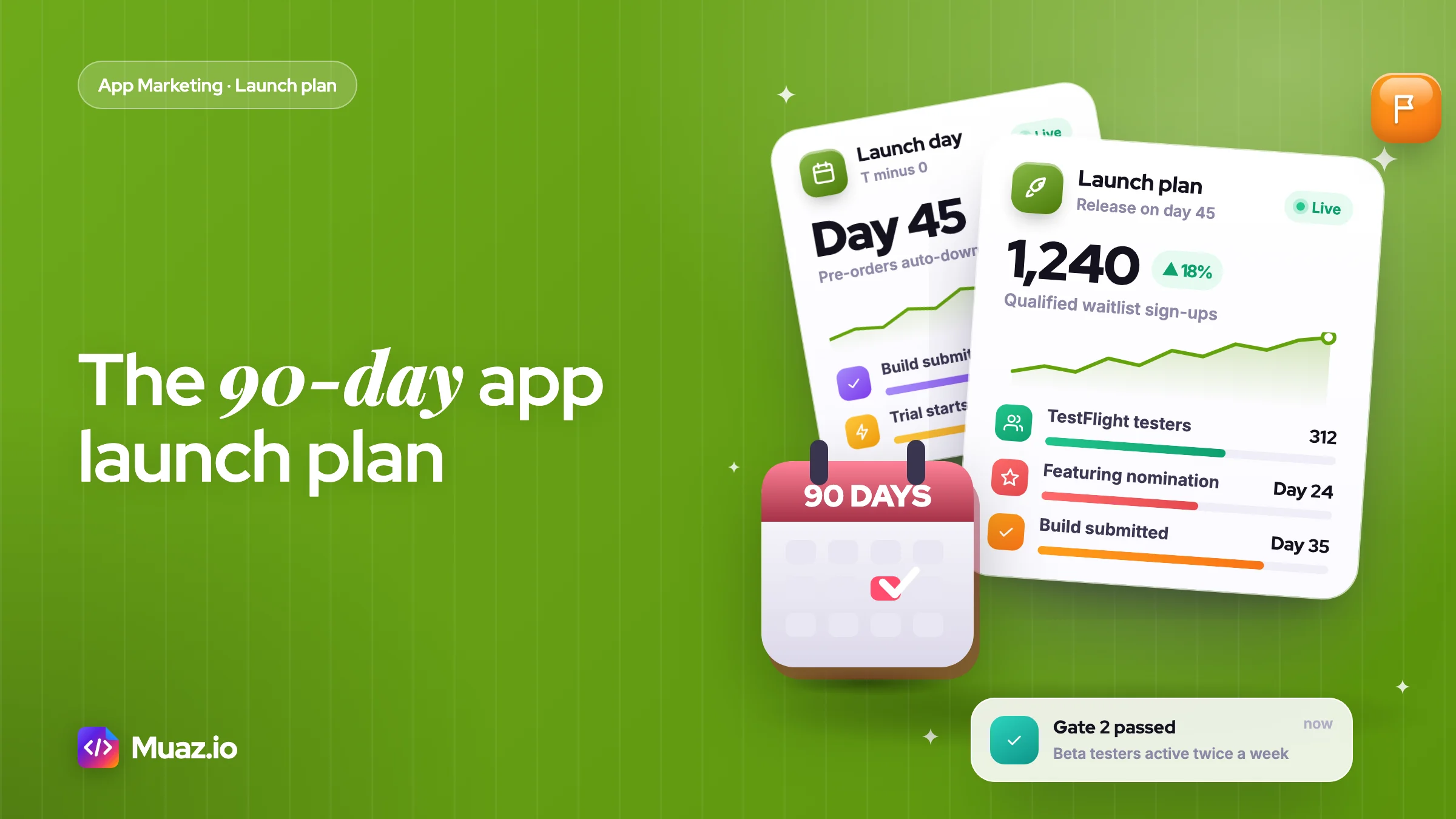
A 90-day app launch plan splits app marketing into three 30-day blocks: build a waitlist before release, run the beta and launch, then grow the channel that produces paying users. Each block has one metric and a go or no-go gate, so you only move on when the previous step has worked.
- Start marketing your app at least 45 to 60 days before release, because the waitlist, beta and store lead times need that long.
- A qualified waitlist of around 1,000 people is a strong target for a consumer app, and 100 well-matched users can be enough for a niche professional app.
- An app launch KPI dashboard should track the funnel from store visit to paying user in ten numbers or fewer, reviewed weekly.
- Six to eight emails is enough for most app launch email sequences. Confirm the sign-up, tell the founder story, open the beta, announce the pre-order, count down, launch, share results and ask for a review.
It is 11pm on launch day. The app went live at 9am, you posted on X, LinkedIn and two subreddits, and the App Store Connect dashboard says 61 downloads. Half of them are friends. Nobody is writing about you, the reviews tab is empty and the one paid test you ran cost more per install than your monthly subscription price.
I have watched this happen to good apps many times, and it is almost never a product problem on day one. It is a calendar problem, and a 90-day app launch plan is how you fix it. The founder started marketing the week they shipped, when the work that decides launch day has to start about two months earlier.
This article is the plan I would hand a founder who is 90 days away from release. It covers the pre-launch waitlist, the beta, launch week, the first month of growth, the email sequence, the KPI dashboard and the budget, with every Apple and Google Play rule checked against the official docs. Copy the templates, change the dates and start on Monday.
What is a 90-day app launch plan?
A 90-day app launch plan is a dated schedule that splits app marketing into three 30-day blocks: build demand before release, launch and collect proof, then grow what works, with one measurable goal and a go or no-go gate at the end of each block.
The three blocks are not equal in effort. Days 1 to 30 are about people: who the app is for, where they hang out and how many will give you an email address. Days 31 to 60 contain the beta and the release itself. Days 61 to 90 are the post launch app growth plan, where you stop guessing and start doubling down on the channel that actually produced paying users.
Most 30 60 90 day templates online were written for new hires, not apps. They tell you to "learn the codebase" in month one. An app marketing plan needs different things: store rules with lead times, review windows, a waitlist that converts and a metric that tells you when to spend money. If you want the wider strategy first, start with the pillar guide on how to market an app in 2027 and come back here for the calendar.
The 90-day app marketing plan at a glance
Here is the whole plan on one screen. Day 45 is the release date in this version, which leaves enough room on either side. Shift every date if your release moves, but keep the gaps between them.
| Block | Days | Main goal | Key outputs | Gate to pass |
|---|---|---|---|---|
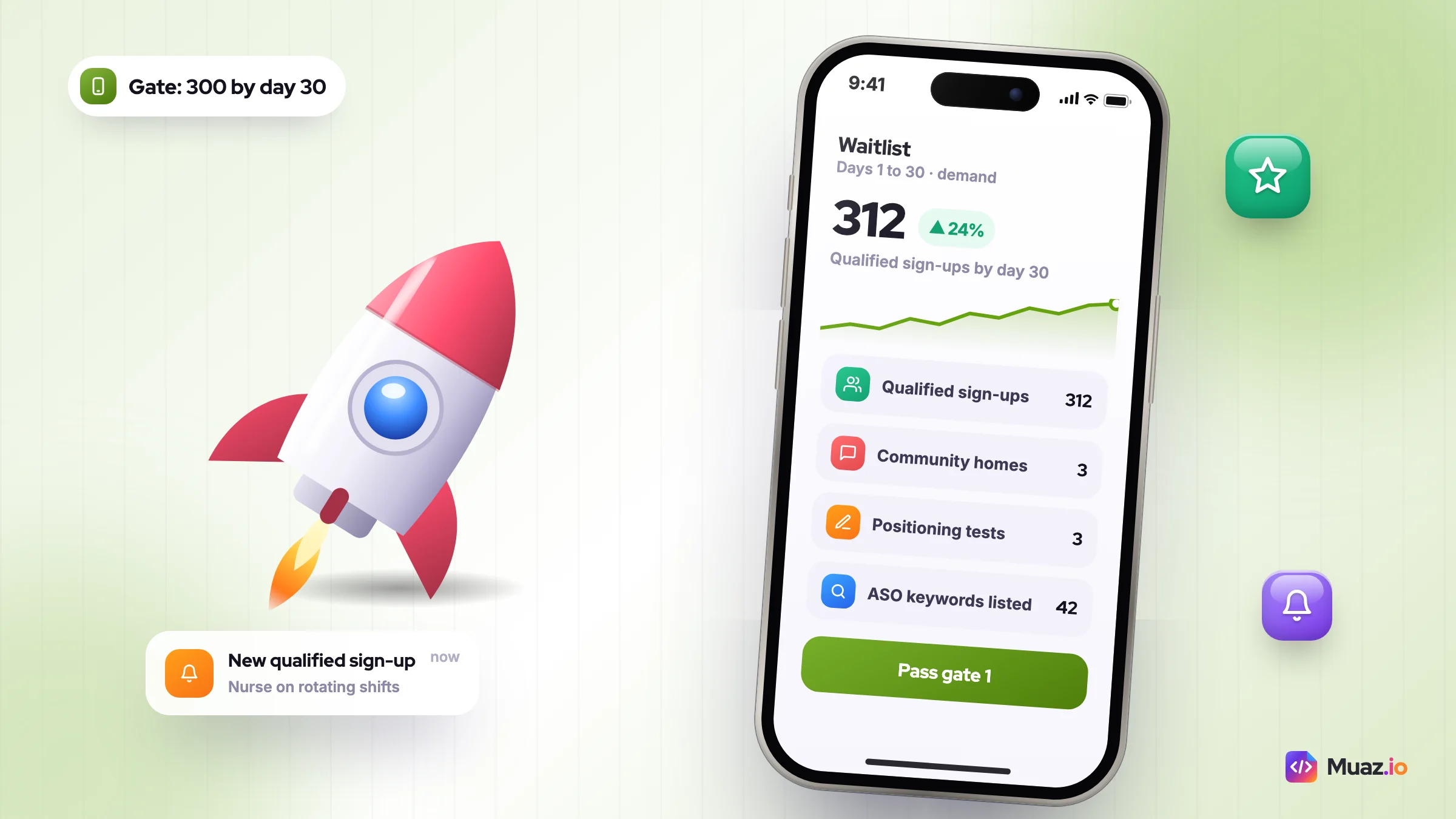
| Demand | 1 to 30 | Prove people want it | Positioning line, landing page, waitlist, 3 community homes, ASO keyword list | 300+ waitlist sign-ups or 20 user calls |
| Beta | 21 to 40 | Prove they use it | TestFlight public link, feedback loop, first testimonials, pre-order or pre-registration | Beta testers complete the core action twice in a week |
| Launch | 41 to 60 | Turn attention into installs | Store page, featuring nomination, launch emails, Product Hunt day, community posts | Install-to-trial or install-to-signup rate stable for 7 days |
| Growth | 61 to 90 | Find one repeatable channel | Product page tests, custom product pages, Apple Ads test, In-App Event, content cadence | One channel with a cost per paying user below 3 months of revenue |
The gates matter more than the tasks. If you reach day 30 with 40 sign-ups, you do not move on to a big launch. You fix the positioning, because a launch only amplifies whatever demand already exists.
Before day 1: pick your one metric and your launch date
Two decisions shape everything else, so make them before you write a single tweet.
Choose one north-star metric per block
Downloads are a vanity number on their own. I set one metric per block instead:
- Days 1 to 30: waitlist sign-ups from people who match your target user, not total sign-ups.
- Days 31 to 60: activation rate, meaning the share of new installs who complete the core action (log a habit, scan a receipt, finish a lesson) in the first session.
- Days 61 to 90: paying users per week and the cost to get each one.
Lock the release date with buffers
Apple says App Review handles at least 50% of submissions in under 24 hours and 90% in under 48 hours, according to its App Review overview. That is fast, but a rejection resets the clock, so I submit the final build seven to ten days before the public date and use a manual or scheduled release.
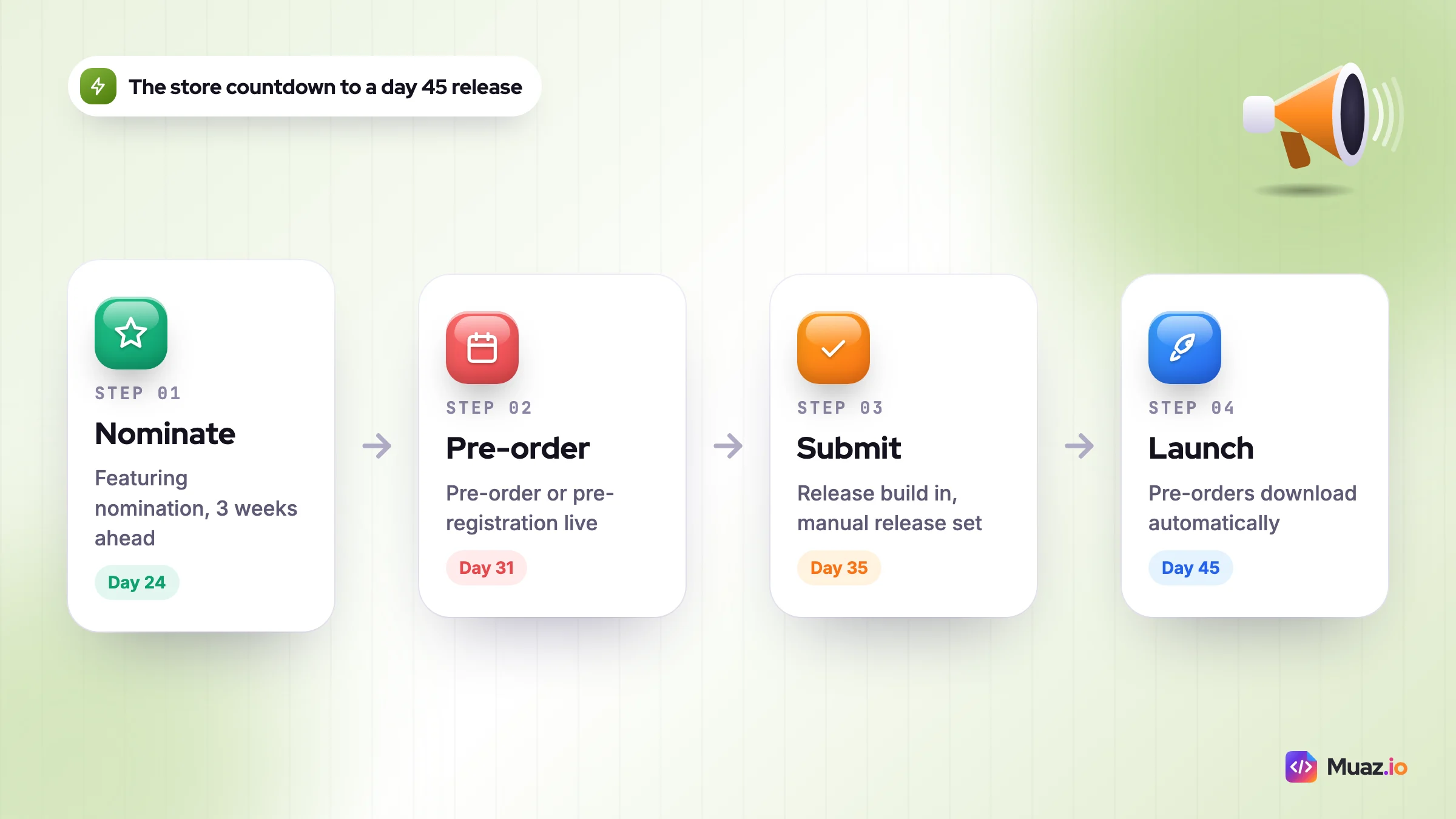
Featuring needs even more notice. Apple's help page on featuring nominations recommends submitting "as early as possible, with a minimum lead time of 3 weeks". Put that deadline on the calendar now: in this plan it is day 24 for a day 45 release.
Before you set any of this in stone, check who you are up against. Read the top five apps' reviews, screenshots and pricing, or run a competitor research scan so the positioning you write on day 1 is based on real gaps rather than hope.
Days 1 to 30: the pre-launch app waitlist strategy
A pre-launch app waitlist is a list of people who asked to be told when your app is ready, and its job is to give you a warm audience for the first 48 hours after release. Those early installs, ratings and reviews are what make the rest of the launch easier.
Write the positioning line first
Your landing page headline, store subtitle and every post come from one sentence. I use this fill-in format:
[App name] helps [specific person] [get a specific result] without [the annoying thing they do now].
Say you run a habit-tracking app for shift workers. "Track habits" is generic. "Build routines that survive night shifts, without a streak that breaks every time your rota changes" is a reason to sign up. Test two or three versions as posts in the communities from step three and keep the one that gets replies.
Build a waitlist page that asks for one thing
The page needs a headline, one phone mock-up, three short benefit lines and an email field. That is all. Pages packed with feature grids and long videos explain the app before the visitor has a reason to care. Two optional extras earn their place:
- One qualifying question after sign-up, such as "What do you use now?". It tells you who is on the list and gives you copy for the store page.
- A referral link that moves people up the beta queue. Reward with earlier access or a founder badge, not free lifetime subscriptions you will regret.
Pick three community homes and show up daily
Waitlists do not fill themselves. Choose three places where your target user already talks about the problem: one subreddit, one creator platform (TikTok, Reels or YouTube Shorts) and one professional or founder space such as X, LinkedIn or Indie Hackers. Spend 30 to 45 minutes a day being useful there before you ever drop a link. The guides on Reddit marketing for apps and building in public on X and LinkedIn cover the posting formats that work in each.
Start ASO research in week two, not launch week
Your app name, subtitle and keyword field decide whether you get search traffic after the launch spike fades. Apple Ads says almost 65% of App Store downloads happen directly after a search, based on its worldwide 2022 data on the Apple Ads Advanced page. Build a list of 30 to 50 phrases now, group them by intent and pick the ten you will target. The free ASO keyword tool checks your 30-character name and subtitle limits as you draft.
What size waitlist is enough?
There is no official benchmark, so here is my rule of thumb. For a consumer app, I want at least 300 qualified sign-ups by day 30 and 1,000 by launch. For a niche B2B or professional app, 100 people who answered the qualifying question with a real job title beats 2,000 random emails. If you are far below that by day 30, the gate says stop and rewrite the positioning, not push harder.
How do you run an app beta launch that markets itself?
App beta launch marketing means treating your test group as your first community: you recruit testers from the waitlist, ask them for specific feedback and turn their words into store copy, testimonials and launch-day posts.
On iPhone the tool is TestFlight. According to the TestFlight overview in App Store Connect Help, you can add up to 100 internal testers from your team and up to 10,000 external testers, invited by email or by a public link, and each build can be tested for up to 90 days. The first build you send to external testers has to pass App Review, so allow a day or two.
Here is how I run the beta in days 21 to 40:
- Invite in waves. Send the public link to the first 50 to 100 people on the waitlist, the ones who answered the qualifying question. Add another wave each week.
- Ask one question per build. "Did you finish setting up your first routine? If not, where did you stop?" gets answers. "Any feedback?" gets silence.
- Run five short calls. Twenty minutes each, screen shared. You will learn more from watching five people onboard than from 200 survey replies.
- Collect proof as you go. Ask testers who love it for a one-line quote and permission to use their first name. These become launch-day social proof and store screenshot captions.
- Ship two fixes publicly. Tell the whole list what you changed because of tester feedback. It turns testers into people with a stake in the launch.
For Android, Google Play's closed and open testing tracks do the same job. If you plan to release on both stores, I launch iOS first, learn for two to four weeks, then bring the improved version to Google Play.
Days 31 to 60: the app launch timeline template
This is the busy block. You are finishing the beta, setting up the store pages, warming up launch platforms and then releasing. Work backwards from your release date (day 45 here).
Store setup: pre-orders and pre-registration
Once your app has passed review, you can put it on pre-order. Apple's pre-order documentation says a new app's release date can be 2 to 180 days after the pre-order is published, and on release day the app downloads automatically to the devices of people who pre-ordered. Apple does not tell those people if the date moves, so keep the date out of your marketing unless you are sure.
On Google Play, a pre-registration campaign can run for up to 90 days, after which you must launch to production. Pre-registered users get a Play Store notification at launch and, on eligible devices, an automatic install. Start it around day 31 so it lands well inside the 90-day window.
Point your waitlist at the pre-order page in the second email of your sequence. A pre-order is a stronger signal than an email address, and it moves those people from your list into Apple's own release-day notification.
The launch countdown, week by week
| When | Store and product | Marketing | Owner |
|---|---|---|---|
| Day 24 (T minus 21) | Featuring nomination in App Store Connect, App Launch type | Draft launch emails and posts | Founder |
| Days 28 to 33 | Final screenshots and preview video, metadata locked | Schedule Product Hunt post (up to a month ahead) | Founder or designer |
| Day 35 (T minus 10) | Submit release build, set manual release | Brief 5 to 10 creators or newsletter writers | Founder |
| Days 38 to 44 | Fix last beta bugs, test the paywall | Teaser posts, "one week to go" email | Whole team |
| Day 45 (launch) | Release, watch crashes and reviews hourly | Launch email, Product Hunt, community posts | Everyone online |
| Days 46 to 52 | First update with fixes | Reply to every review and comment, results post | Founder |
| Days 53 to 60 | Request a rating after a success moment | Directories, Show HN or a second launch event | Founder |
For the screenshots, design the first three frames as a story: the problem, the result, the proof. The free App Store screenshot generator exports every required iPhone and iPad size, which saves an afternoon of resizing.
Launch day hour by hour
Product Hunt's own launch preparation guide recommends going live at 12:01am Pacific time so you get a full 24-hour cycle, lets you schedule up to a month ahead and reports that 70% of Product of the Day, Week or Month winners had a first comment from the maker. It also tells you to ask for feedback, not upvotes. If Product Hunt fits your audience, run it on launch day or the day after, and keep other big events a few days apart so you can measure each one. The full list of boards and directories is in where to launch an app.
- Hour 0: release the app, check the live store page on a real device, confirm purchases work.
- Hour 1: send the launch email to the waitlist and testers. Post the founder story on your main social channel.
- Hours 2 to 10: answer every comment within an hour. Watch crash reports and the paywall conversion rate.
- Hour 10: post a short "what happened so far" update. Real numbers get shared more than polished announcements.
- End of day: write down installs, trials or sign-ups, top three complaints and the channel that sent the most people.
The app launch email sequence (copy these)
An app launch email sequence is a set of six to eight planned emails that warm up your waitlist, push people to pre-order or join the beta, announce the release and then help new users reach their first success.
Email still beats social for launch day because you own the list and nobody's algorithm decides who sees it. Mailchimp's email marketing benchmarks put the all-industry average open rate at 35.63% and click rate at 2.62%, from data last updated in December 2023. A warm waitlist that asked to hear from you should beat those numbers. If it does not, the list was filled with the wrong people.
| # | Send on | Subject line | Job of the email |
|---|---|---|---|
| 1 | Instantly on sign-up | You're on the list (and a quick question) | Confirm, ask the qualifying question, set expectations |
| 2 | Day 7 after sign-up | Why I'm building [app] | Founder story, the problem, one early screen |
| 3 | When beta opens | Want early access? | TestFlight public link for the first wave |
| 4 | T minus 14 | It's on the App Store for pre-order | Pre-order link, launch date if fixed |
| 5 | T minus 2 | Thursday is the day | What launches, what is free, how to help |
| 6 | Launch day, hour 1 | [App] is live | Download link, one-line value, launch offer |
| 7 | Launch plus 3 days | What 1,000 of you did first | Results, tips, the most-used feature |
| 8 | Launch plus 10 days | Has [app] helped yet? | Ask for a review or reply; route problems to support |
Here is the launch-day email I would start from. Change the bracketed parts and keep it short:
Subject: [App] is live
Hi [first name], [App] is on the App Store today. It helps you [result] in [time]. You joined the list on [date], so you get [launch offer] until Sunday. Download it here: [link]. If anything breaks, reply to this email and I'll fix it this week. Thank you for waiting, [your name].
Notice what is missing: no feature list, no "we're thrilled to announce". One result, one offer, one link and a reason to reply. After launch, the onboarding emails hand over to your lifecycle programme, which the app retention marketing guide covers in depth.
The app launch campaign checklist
Print this, or paste it into your task tool. If a line is not ticked by its block's end date, it is either moved deliberately or dropped.
Days 1 to 30
- Positioning line tested in at least two communities
- Waitlist page live with one qualifying question and analytics
- Three community homes chosen, posting daily
- Competitor teardown of the top five apps done
- Featuring nomination submitted by day 24 (3 weeks before release)
- ASO keyword list of 30 to 50 phrases, ten chosen
- Email tool set up with emails 1 and 2 automated
Days 31 to 60
- TestFlight public link live, first wave invited
- Pre-order (iOS) or pre-registration (Google Play) live
- Screenshots, preview video and metadata final
- Release build submitted 7 to 10 days early
- Launch emails 4 to 6 scheduled, launch posts drafted
- Product Hunt or other launch event scheduled
- Crash reporting and purchase analytics verified on a real device
Days 61 to 90
- First product page optimisation test running
- Two custom product pages for your top two audiences
- Apple Ads test with a fixed budget and a stop rule
- First In-App Event scheduled
- Weekly KPI review in the calendar
- Decision made: which one channel gets more time and money
Free: 90-Day App Launch Plan Template (2027)
A copyable day-by-day calendar with gates, the eight-email launch sequence, the KPI dashboard and the full campaign checklist.
We’ll email the resource and a few practical tips. Unsubscribe in one click. We never sell your data.
Days 61 to 90: the post launch app growth plan
The launch spike fades within a week or two. What you do in the next 30 days decides whether the app keeps growing. The goal of this block is simple: find one channel where you can buy or earn a paying user for less than they are worth, then put more into it.
Test the store page with Apple's own tools
Apple's product page optimisation lets you test up to three treatments against your original page for icons, screenshots and preview videos. A test runs for up to 90 days, and you can only run one at a time. Start with the first screenshot, because it carries most of the message in search results.
Then build custom product pages. Apple allows up to 70 extra versions of your page, each with its own screenshots, keywords and, on iOS 18 or later, a deep link into the app. Make one per audience: the night-shift nurse version and the student version of the same habit app, each linked from the posts and ads aimed at that group.
On Google Play, store listing experiments test up to two variants against your current listing. Google recommends changing one asset at a time so you know what caused the change.
Run a small, ruled Apple Ads test
Paid search is the most direct way to get in front of people already looking. Apple Ads Basic charges per install at a price you set and suits a first test. Advanced uses cost per tap and gives you keyword control. Eligible new accounts get a 100 USD credit, per Apple's own page.
Set the rules before you spend: a fixed budget, the ten keywords from your ASO list, a 14-day window and a stop rule ("pause any keyword with no trial after 40 taps"). The comparison of Apple Ads vs Google App Campaigns vs Meta Ads shows when each network makes sense.
Create reasons to come back
In-App Events show up on your product page, in search and in editorial spots. Each event can last up to 31 days and can be promoted up to 14 days before it starts, with up to 10 published at once. A "30-day reset challenge" or a new content drop gives lapsed users and new searchers a reason to open the app.
Fix the paywall before you scale anything
RevenueCat's State of Subscription Apps 2025 found that 82% of trial starts happen on the same day as install. If your paywall is not seen in the first session, most of your trials never start. The same report shows a median download-to-paid rate at day 35 of 12.11% for hard paywalls against 2.18% for freemium apps. That is not a reason to force a hard paywall, but it is a reason to test where and when yours appears. Score your current one with the paywall teardown, and see the app monetisation strategy guide for pricing tests.
What should be on an app launch KPI dashboard?
An app launch KPI dashboard is one page, updated weekly, that shows how many people moved through each step from store visit to paying user, so you can see which step is leaking.
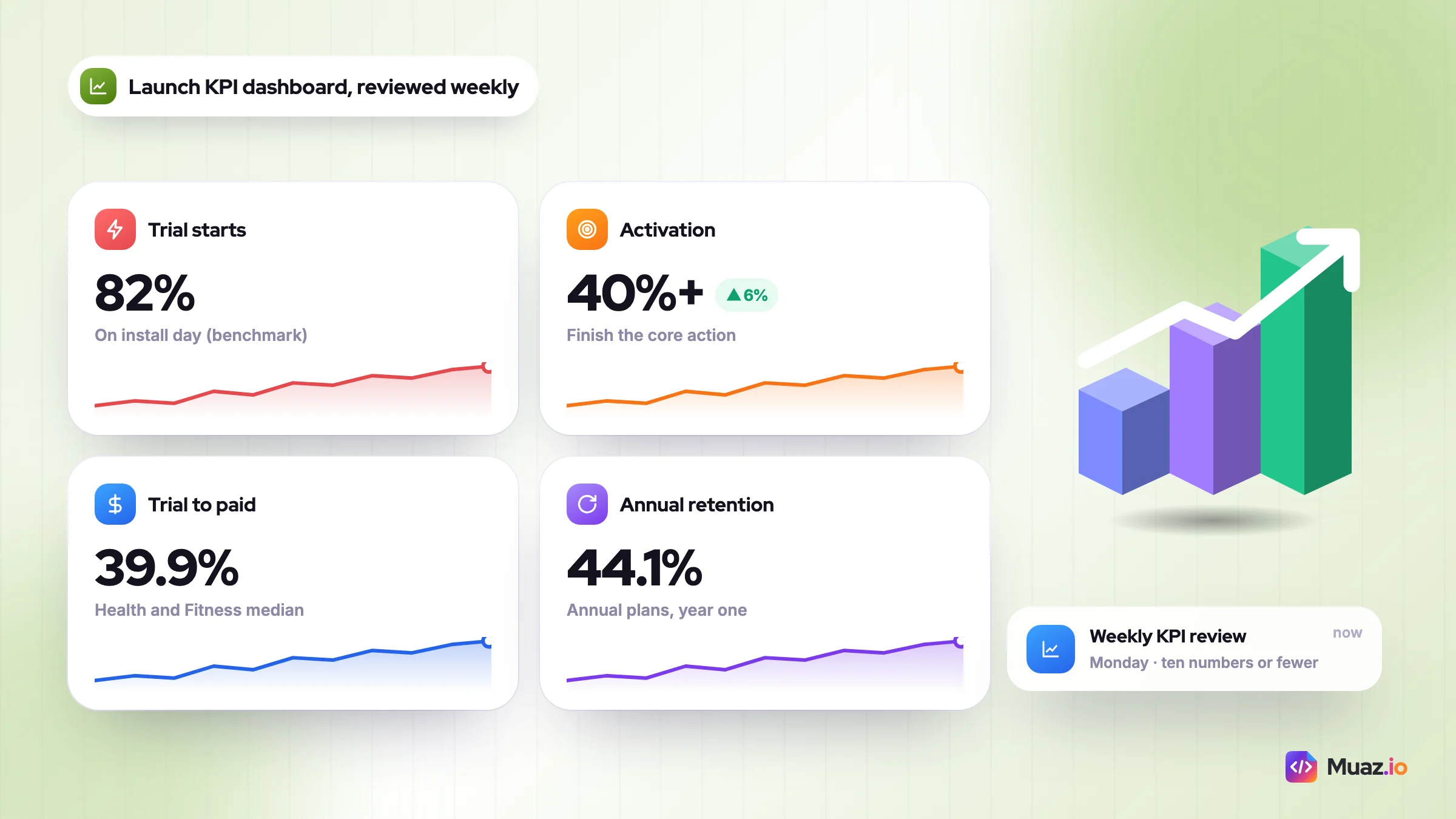
Keep it to ten numbers or fewer. Every number needs a source you trust and a target you set before launch. The benchmarks below come from RevenueCat's 2025 report where noted. The other targets are my working starting points, not industry standards, so replace them with your own data after 30 days.
| KPI | Where to get it | Starting target | If it's low |
|---|---|---|---|
| Waitlist sign-ups (qualified) | Email tool | 300 by day 30 | Rewrite positioning, change communities |
| Product page conversion | App Store Connect analytics | Improve week on week | Test first screenshot and icon |
| Installs per day | App Store Connect | Stable after the spike | More search keywords, custom pages |
| Activation rate | Product analytics | 40%+ finish core action | Shorten onboarding |
| Trial start rate | RevenueCat or your billing tool | Most trials on day 0 (82% benchmark) | Show the paywall in session one |
| Trial-to-paid | Billing tool | Category median, e.g. 39.9% Health and Fitness | Fix trial onboarding emails |
| Day 7 retention | Product analytics | Flat or rising per cohort | Improve the habit loop |
| Ratings and reviews | App Store Connect | Reply to 100% within 48h | Prompt after a success moment |
| Cost per paying user | Ads dashboard plus billing | Below 3 months of revenue | Pause channel or fix funnel |
| Annual plan retention | Billing tool | 44.1% in year one (RevenueCat) | Watch month-one cancellations |
Two more numbers from the RevenueCat report are worth watching early. Year-one retention for annual plans is 44.1%, and nearly 30% of annual subscriptions are cancelled in the first month. If your month-one cancellations look like that, the value you sold on the paywall is not showing up in the product fast enough.
Use the free app revenue calculator to turn these rates into a monthly revenue forecast. It makes the "is this channel worth it?" decision a sum rather than a feeling.
How much does a 90-day app launch cost?
A 90-day app launch can cost almost nothing in cash if you do the work yourself, or several thousand dollars a month once you add paid tools, ads and outside help. The real cost is usually time: expect 10 to 20 hours a week from the founder for the whole 90 days.
The ranges below are my estimates for a single iPhone app, not quoted prices. Check current pricing for any tool or agency before you commit.
| Budget level | Monthly cash (estimate) | What it buys | Best for |
|---|---|---|---|
| Bootstrapped | Under $100 | Email tool free tier, Apple Ads credit, free ASO and screenshot tools, your time | Solo founders testing demand |
| Lean | $300 to $1,500 | Paid email and analytics, small Apple Ads test, a few micro-creators | Apps with early proof |
| Funded | $3,000 to $15,000+ | Wider paid tests, creator programme, freelance designer or marketer | Apps with a working funnel |
| Agency-led | Varies widely by scope | App launch agency or app marketing agency running channels for you | Teams without marketing time |
Before you hire an app marketer or an app launch agency, finish days 1 to 30 yourself. You will brief them far better, and you will know whether their proposal is solving a real problem. When you compare app marketing tools, look for three jobs: keyword research, store page creative and a single place to see your funnel.
This is where Muaz.io fits if you want help. Growth Studio, part of the Pro plan on the Muaz.io pricing page, generates a 30/60/90-day plan from your app and your competitors, and ten- or twenty-app competitor reports are available as one-time purchases. It does not replace talking to users, but it removes the blank-page problem in week one.
The app go-to-market plan template
A go-to-market plan does not need to be a 30-page deck. Fill in this one page before day 1 and pin it somewhere you will see it every day.
- Target user: one sentence, with a job title, life stage or situation. "Nurses on rotating shifts" not "busy people".
- Problem and current workaround: what they do today and why it annoys them.
- Positioning line: the fill-in sentence from the waitlist section.
- Price and model: free trial length, monthly and annual price, what sits behind the paywall.
- Three channels: the three community homes plus one owned channel (email).
- Launch date and lead-time deadlines: release day, featuring nomination day, build submission day.
- Block goals: one metric and one gate for each 30-day block.
- Budget: cash per month and hours per week, with a stop rule for paid tests.
- Risks: the two things most likely to delay launch, and what you will do if they happen.
Pair it with the wider list of app marketing channels in the pillar guide if you are unsure which three to pick. The answer is nearly always the channels where your target user already spends time, not the ones that worked for someone else's app.
Why most 90-day launch plans stall
The same five mistakes come up again and again in the launches I review.
- Skipping the gates. The founder reaches day 30 with a tiny list and launches anyway because the date was announced. Move the date. Nobody remembers a delayed launch; plenty remember a dead one.
- Stacking every event on one day. Product Hunt, Show HN, a Reddit post and a paid push on the same morning give you one spike and no idea what caused it.
- Asking for reviews too early. Ask after a success moment, such as a finished task or a seven-day streak, never on first open or after an error.
- Scaling ads before the paywall works. Paying for installs that never start a trial is the fastest way to burn a launch budget.
- Going quiet after week one. The launch is not the finish line. Days 61 to 90 are where search traffic, custom product pages and retention start compounding.
None of these is about talent or budget. They are all about sticking to the calendar and being honest at each gate.
What to do this week
If you are 90 days from release, here is the first week, in order:
- Monday: set the release date, then write the featuring nomination deadline (release minus 21 days) and build submission deadline (release minus 10) into your calendar.
- Tuesday: write three versions of your positioning line and read the one-star reviews of your top five competitors.
- Wednesday: put up the waitlist page with one qualifying question and automate emails 1 and 2.
- Thursday: choose your three community homes and post something useful in each, with no link.
- Friday: draft 30 keyword phrases, fill in the one-page go-to-market template and set up the KPI dashboard with blank columns for the next 13 weeks.
That is it for week one. No ads, no press release, no launch video. Just the foundations that make day 45 feel planned rather than hoped for. If you have not built the app yet, you can start building it free on Muaz.io and run this plan alongside the build.

Monjur builds Muaz.io and incorporated MotionTrust Digital in September 2022, where he leads Amazon strategy across the client base. Eight years in e-commerce and marketplace marketing taught him how much growth a great mobile app unlocks, so every guide here is tested against the real product and current App Store rules before it goes live.
Questions about 2027 guide
Short, direct answers. Still curious? Ask in the builder; the assistant knows your project.
What is a 90-day app launch plan?
A 90-day app launch plan splits app marketing into three 30-day blocks: build a waitlist before release, run the beta and launch, then grow the channel that produces paying users. Each block has one metric and a go or no-go gate, so you only move on when the previous step has worked.
When should I start marketing my app before launch?
Start marketing your app at least 45 to 60 days before release, because the waitlist, beta and store lead times need that long. Apple recommends a minimum of three weeks for featuring nominations, and a new app can sit on pre-order for up to 180 days.
How big should my app waitlist be before launch?
A qualified waitlist of around 1,000 people is a strong target for a consumer app, and 100 well-matched users can be enough for a niche professional app. There is no official benchmark, so judge the list by how many sign-ups match your target user rather than the total.
What should be on an app launch KPI dashboard?
An app launch KPI dashboard should track the funnel from store visit to paying user in ten numbers or fewer, reviewed weekly. Include product page conversion, installs, activation, trial starts, trial-to-paid, day 7 retention, reviews and cost per paying user.
How many emails should an app launch email sequence have?
Six to eight emails is enough for most app launch email sequences. Confirm the sign-up, tell the founder story, open the beta, announce the pre-order, count down, launch, share results and ask for a review.
How long does Apple take to review an app before launch?
Apple says it reviews at least 50% of submissions in under 24 hours and 90% in under 48 hours. Submit your release build seven to ten days early so a rejection does not move your launch date.
How do I run a beta for an iPhone app?
Use TestFlight, which allows up to 10,000 external testers through email invites or a public link, with each build available for 90 days. Invite testers from your waitlist in waves, ask one specific question per build and collect quotes for launch day.
How much does it cost to launch an app?
A 90-day app launch can cost under $100 a month in cash if you do the work yourself, and several thousand a month with paid ads, tools and freelance help. Run a small, ruled paid test only after your paywall and onboarding are converting.
Should I use pre-orders or a waitlist for my app?
Use both: a waitlist builds the audience early and a pre-order turns the warmest part of it into automatic release-day downloads. On Google Play, the equivalent is pre-registration, which can run for up to 90 days.
Keep reading
 SaaS & Web Apps18 min readHow to Convert a SaaS Website into a Native iOS App Using AI (2026 Guide)
A practical, step-by-step guide to turning your SaaS web app into a native iPhone app with AI: what to build, how to connect your API and login, push alerts, App Review and cost.
Monjur Hossain· Tools & Comparisons16 min read10 Best AI iOS App Builders in 2026: Features, Pricing & Native Support
We compared 10 AI app builders specifically for iPhone apps: native output, App Store publishing, code ownership, design quality and 2026 pricing, with honest picks by use case.
Monjur Hossain· Website to App15 min readHow to Turn Any Website into an iPhone App Without Coding (Step-by-Step)
A step-by-step, no-code guide to turning your website into a real iPhone app: checking readiness, choosing native vs WebView, AI conversion, testing on TestFlight and App Store approval.
Monjur Hossain· Tools & Comparisons15 min read7 Best Website-to-App Converters in 2026: Native Apps vs WebView
An honest comparison of 7 website-to-app converters in 2026, from WebView wrappers to native AI rebuilds: how each works, App Review risk, features, ownership and published pricing.
Monjur Hossain·Tools and products for the next step
- Paste a URL, get three original designs
- Free research before you pay
- 5, 10 or 20 App Store rivals analysed
- Review themes, pricing and gaps
- Screenshots, metadata and privacy labels
- TestFlight and submission checklist
Where our numbers come from
Third-party figures are estimates published by the sources below. Prices and rules change; check the source before you decide.
- App Review overview (Apple Developer)developer.apple.com/distribute/app-review
- Nominate your app for featuring (App Store Connect Help)developer.apple.com/help/app-store-connect/manage-featuring-nominations/nominate-your-app-for-featuring
- Offering apps for pre-order (Apple Developer)developer.apple.com/app-store/pre-orders
- TestFlight overview (App Store Connect Help)developer.apple.com/help/app-store-connect/test-a-beta-version/testflight-overview
- Preparing for launch (Product Hunt)www.producthunt.com/launch/preparing-for-launch
- Product page optimization (Apple Developer)developer.apple.com/app-store/product-page-optimization
- Custom product pages (Apple Developer)developer.apple.com/app-store/custom-product-pages
- In-App Events (Apple Developer)developer.apple.com/app-store/in-app-events
- Apple Ads Advanced (Apple)ads.apple.com/app-store/advanced
- Apple Ads Basic (Apple)ads.apple.com/app-store/basic
- Set up pre-registration (Google Play Console Help)support.google.com/googleplay/android-developer/answer/9084187?hl=en
- Store listing experiments (Google Play Console Help)support.google.com/googleplay/android-developer/answer/6227309?hl=en
- State of Subscription Apps 2025 (RevenueCat)www.revenuecat.com/state-of-subscription-apps-2025
- Email marketing benchmarks (Mailchimp)mailchimp.com/resources/email-marketing-benchmarks